cancel
Showing results for 
Search instead for 
Did you mean: 

The Power BI Data Visualization World Championships is back! Get ahead of the game and start preparing now! Learn more

Reply
Anonymous
Not applicable

Clustered Column Chart Visual

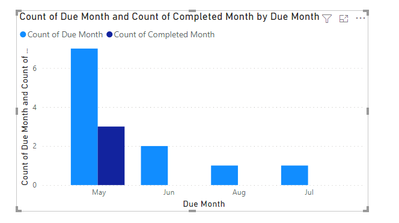
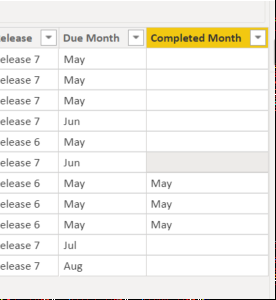
Hi, I have a clustered column chart visual to show the comparison between the number of due tasks and number of completed tasks per month. There should only be 3 completed task in May however this is not the case. Please help? 


image.pngimage.png

1 ACCEPTED SOLUTION
v-yingjl
Community Support
Community Support

Hi @Anonymous ,

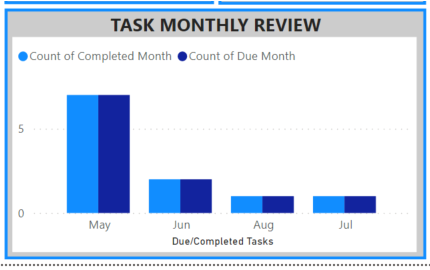
You can create a measure to count:

Count of Completed Month = 
CALCULATE (
    COUNT ( 'Table'[Completed Month] ),
    FILTER ( 'Table', 'Table'[Due Month] = 'Table'[Completed Month] )
)
re.png


Best Regards,
Community Support Team _ Yingjie Li
If this post helps, then please consider Accept it as the solution to help the other members find it more quickly.

View solution in original post

2 REPLIES 2
v-yingjl
Community Support
Community Support

Hi @Anonymous ,

You can create a measure to count:

Count of Completed Month = 
CALCULATE (
    COUNT ( 'Table'[Completed Month] ),
    FILTER ( 'Table', 'Table'[Due Month] = 'Table'[Completed Month] )
)

re.png


Best Regards,
Community Support Team _ Yingjie Li
If this post helps, then please consider Accept it as the solution to help the other members find it more quickly.
lbendlin
Super User
Super User

Show your data model, especially how you connect to your Calendar table (or tables)

Helpful resources

Announcements
Power BI DataViz World Championships

Power BI Dataviz World Championships

The Power BI Data Visualization World Championships is back! Get ahead of the game and start preparing now!

December 2025 Power BI Update Carousel

Power BI Monthly Update - December 2025

Check out the December 2025 Power BI Holiday Recap!

FabCon Atlanta 2026 carousel

FabCon Atlanta 2026

Join us at FabCon Atlanta, March 16-20, for the ultimate Fabric, Power BI, AI and SQL community-led event. Save $200 with code FABCOMM.

Top Solution Authors