cancel
Showing results for 
Search instead for 
Did you mean: 

The Power BI Data Visualization World Championships is back! It's time to submit your entry. Live now!

Reply
Fab117
Helper IV
Helper IV

Clean database in Power Query (remove cell content according to rules)

Hello,

I’ve a consolidated database (consolidation of weekly reports) to track challenges on weekly basis.

Looks:

Report

Initiation Date

Initiator

Topic

Issue Description

Supplier

Product / SKU

Action

Owner

Due date

Status

w01 2023

04.01.2023

Paul

RM

Red color not available

A

AA

1. Ask supplier about due date
2. Inform customer
3. Look for alternatives

Paul

w03

Oprn

w01 2023

04.01.2023

Michael

Equipment

Equipment broken no spare part available

B

BB

1. Order spare part
2. Transfer to 2nd line

Mick

w04

Open

w02 2023

04.01.2023

Paul

RM

Red color not available

A

AA

1. Ask supplier about due date
2. Inform customer
3. Look for alternatives

Paul

w03

Open

w02 2023

04.01.2023

Michael

Equipment

Equipment broken no spare part available

B

BB

1. Order spare part
2. Transfer to 2nd line

Mick

w04

Open

w02 2023

11.01.2023

Matt

Quality

Product not conform

C

CC

1. Investigate

Rob

w03


w03 2023

04.01.2023

Paul

RM

Red color not available

A

AA

New material only available w08
Customers informed
Alternative source under assessment

Paul

w05

Open

w03 2023

04.01.2023

Michael

Equipment

Equipment broken no spare part available

B

BB

1. Order spare part
2. Transfer to 2nd line

Mick

w04

Open

w03 2023

11.01.2023

Matt

Quality

Product not conform

C

CC1

Product rejected. Topic to be closed

Rob


Closed


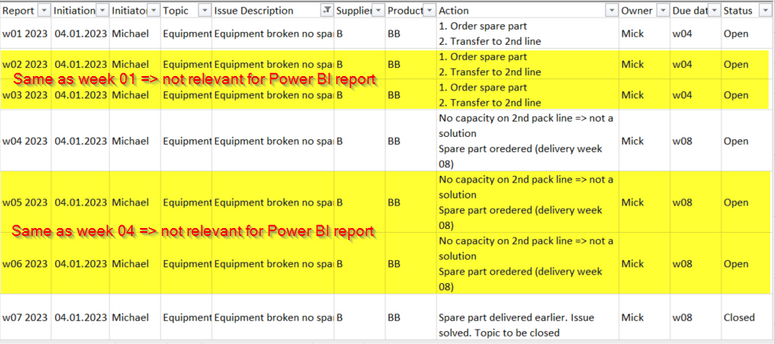
As visible in this consolidated database, each action follow up is not done every week => meaning that field “Action” in my database remain the same until any update.

E.g.:

Fab117_0-1678377325154.png


Would there be a way in Power Query to remove lines where:

“Initiation Date”, “Initiator”, “Topic”, “Issue Description”, “Supplier”, “Product / SKU”, “Action” are exactly the same as a older (based on “Report”) one


I prepared a demo file (link) which should be more clear than I am 😁


Thanks in advance for looking at my issue.


Fab

1 ACCEPTED SOLUTION
lbendlin
Super User
Super User

You are not indicating which week entry you want to keep.  Here's a version that keeps the first entry:

let
    Source = Table.FromRows(Json.Document(Binary.Decompress(Binary.FromText("3ZdbT9swFMe/ylGfNqlCacqlL3soaJOYBmxs0h6AB9c+LV5dO/OFqN9+56SXNGigDIFGeEja2mn9v/waOVdXvTIbQJ7lw16/9xOVxaDEsg+fhU3CL2G/v5n8KpKhl8szPqEC6YzzYF0EcSe0ERODNDPmg0+DPRiHOYRUFEajBzFxKYJKCEpEvPbXNt+DUzt1fgEyhegW6Hl0uAdfnJsDTYAwEb0VUd9hqBWUGcu5KLzt3fTb6z/T8lYg/8DH30kXC7Rx9z1MvJujJUMQCuER6NS0dszH8crahVfkqb5w7eeHFzZMaSY6yK0Coy2ulp5Xwvcr4bgRnncz+H/U37HgB4NauYgs9VsSRsclB+GdSjJW4UtXZUijJ3ycrPSdWoos6hlFzXW5yTa39dLDl+j8HEtY0JJeCwPOmmV9GZTZiEM6WVcdQFe6UfHouC4agkteIiTLCYsQMIR1V9v+D5oxtvPyCvt/TPhT+x/szHv8hTKiImGu0JJVTRCkcQHVFgv+1mqkhajRVtQxlWw5QIt+xqJObUjTqZaawyxcSSl8uE5ZNqTu0ShtZ6ESHKJ3dgZoXZrdbmXnzFBV9uZqIkneUn5AtdkZAt8PlNJRO0t0rRao7i7LHTXlIG9GvP+GOG/n5fk4P3cgRSEkQUcuK6Dp07yietttFRKZMYmbYZPf6591HskdBfpOoSHTJLREnEM2er/7txi199k9Ag+6TODhU7x0n8DHfHaPwMP/ROCDrOlFYZBREOxkl7ejpyjvPm+P+XwbvH3Cia/sjB7e1lyeAT8juCn1hDLs0rbab1liruJzw8v9lY9eD+lbxuvtlxS2sf9qUN/Yg7Xz8Xzc34N4jS5Fg8Lz0xs9UISQ2Ju5e3A72YC7tZ3u4f03Ny+O980f", BinaryEncoding.Base64), Compression.Deflate)), let _t = ((type nullable text) meta [Serialized.Text = true]) in type table [Report = _t, #"Initiation Date" = _t, Initiator = _t, Topic = _t, #"Issue Description" = _t, Supplier = _t, #"Product / SKU" = _t, Action = _t, Owner = _t, #"Due date" = _t, Status = _t]),
    #"Changed Type" = Table.TransformColumnTypes(Source,{{"Report", type text}, {"Initiation Date", type date}, {"Initiator", type text}, {"Topic", type text}, {"Issue Description", type text}, {"Supplier", type text}, {"Product / SKU", type text}, {"Action", type text}, {"Owner", type text}, {"Due date", type text}, {"Status", type text}}),
    #"Removed Duplicates" = Table.Distinct(#"Changed Type", {"Initiation Date", "Initiator", "Topic", "Issue Description", "Supplier", "Product / SKU", "Action", "Owner", "Due date", "Status"})
in
    #"Removed Duplicates"

How to use this code: Create a new Blank Query. Click on "Advanced Editor". Replace the code in the window with the code provided here. Click "Done".


View solution in original post

2 REPLIES 2
lbendlin
Super User
Super User

You are not indicating which week entry you want to keep.  Here's a version that keeps the first entry:

let
    Source = Table.FromRows(Json.Document(Binary.Decompress(Binary.FromText("3ZdbT9swFMe/ylGfNqlCacqlL3soaJOYBmxs0h6AB9c+LV5dO/OFqN9+56SXNGigDIFGeEja2mn9v/waOVdXvTIbQJ7lw16/9xOVxaDEsg+fhU3CL2G/v5n8KpKhl8szPqEC6YzzYF0EcSe0ERODNDPmg0+DPRiHOYRUFEajBzFxKYJKCEpEvPbXNt+DUzt1fgEyhegW6Hl0uAdfnJsDTYAwEb0VUd9hqBWUGcu5KLzt3fTb6z/T8lYg/8DH30kXC7Rx9z1MvJujJUMQCuER6NS0dszH8crahVfkqb5w7eeHFzZMaSY6yK0Coy2ulp5Xwvcr4bgRnncz+H/U37HgB4NauYgs9VsSRsclB+GdSjJW4UtXZUijJ3ycrPSdWoos6hlFzXW5yTa39dLDl+j8HEtY0JJeCwPOmmV9GZTZiEM6WVcdQFe6UfHouC4agkteIiTLCYsQMIR1V9v+D5oxtvPyCvt/TPhT+x/szHv8hTKiImGu0JJVTRCkcQHVFgv+1mqkhajRVtQxlWw5QIt+xqJObUjTqZaawyxcSSl8uE5ZNqTu0ShtZ6ESHKJ3dgZoXZrdbmXnzFBV9uZqIkneUn5AtdkZAt8PlNJRO0t0rRao7i7LHTXlIG9GvP+GOG/n5fk4P3cgRSEkQUcuK6Dp07yietttFRKZMYmbYZPf6591HskdBfpOoSHTJLREnEM2er/7txi199k9Ag+6TODhU7x0n8DHfHaPwMP/ROCDrOlFYZBREOxkl7ejpyjvPm+P+XwbvH3Cia/sjB7e1lyeAT8juCn1hDLs0rbab1liruJzw8v9lY9eD+lbxuvtlxS2sf9qUN/Yg7Xz8Xzc34N4jS5Fg8Lz0xs9UISQ2Ju5e3A72YC7tZ3u4f03Ny+O980f", BinaryEncoding.Base64), Compression.Deflate)), let _t = ((type nullable text) meta [Serialized.Text = true]) in type table [Report = _t, #"Initiation Date" = _t, Initiator = _t, Topic = _t, #"Issue Description" = _t, Supplier = _t, #"Product / SKU" = _t, Action = _t, Owner = _t, #"Due date" = _t, Status = _t]),
    #"Changed Type" = Table.TransformColumnTypes(Source,{{"Report", type text}, {"Initiation Date", type date}, {"Initiator", type text}, {"Topic", type text}, {"Issue Description", type text}, {"Supplier", type text}, {"Product / SKU", type text}, {"Action", type text}, {"Owner", type text}, {"Due date", type text}, {"Status", type text}}),
    #"Removed Duplicates" = Table.Distinct(#"Changed Type", {"Initiation Date", "Initiator", "Topic", "Issue Description", "Supplier", "Product / SKU", "Action", "Owner", "Due date", "Status"})
in
    #"Removed Duplicates"

How to use this code: Create a new Blank Query. Click on "Advanced Editor". Replace the code in the window with the code provided here. Click "Done".


This is doing perfectly the job.

Thank you very much


Fab

Helpful resources

Announcements
Power BI DataViz World Championships

Power BI Dataviz World Championships

The Power BI Data Visualization World Championships is back! It's time to submit your entry.

January Power BI Update Carousel

Power BI Monthly Update - January 2026

Check out the January 2026 Power BI update to learn about new features.

FabCon Atlanta 2026 carousel

FabCon Atlanta 2026

Join us at FabCon Atlanta, March 16-20, for the ultimate Fabric, Power BI, AI and SQL community-led event. Save $200 with code FABCOMM.