cancel
Showing results for 
Search instead for 
Did you mean: 

Get Fabric Certified for FREE during Fabric Data Days. Don't miss your chance! Request now

Reply
alexproulx
New Member

Categorise item based on a text field (product category) and a number (its weight)

Hello,


I tried to find an answer but was not able to find anything.

English is a second language sorry if I'm unclear.


In PowerQuery, I'm trying to automatically categorize products based on their category and net weight.


Here is an example of the final result I'm trying to achieve :


SKUNiv1Niv2Niv3Net WeightSize
12FoodCatDry2.5Small
13FoodCatDry7Large
14FoodDogDry7Medium
15FoodDogDry15Large


Cat between 0 and 3 kg, it's a small bag, 3 and 8 it's a large bag.

But in the dog food i.e. 7kg is considered a medium bag.


I'm directly logged in to a material table in SAP via an OData link, but that information is not managed or maintained in SAP.

I initially tried to map every actual available size for each segment but as we create new SKUs, new weights are available so I would rather use a range logic.


Please let me know if there's any more information I can provide.

Thanks for the support

Best!


1 ACCEPTED SOLUTION
camargos88
Community Champion
Community Champion

@alexproulx ,


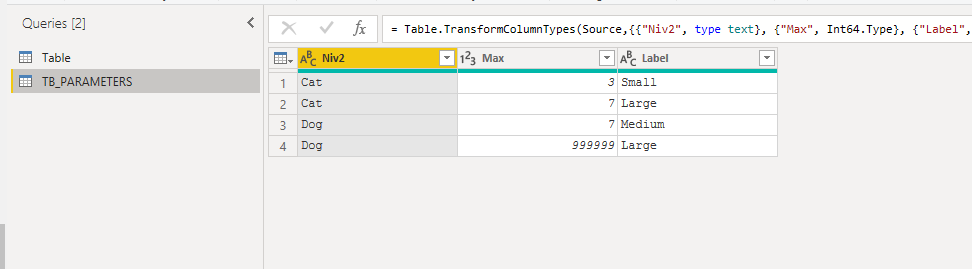
You can create a table with the parameters and a custom column to calculate it.


Capture.PNGCapture.PNG


let 
_cat = [Niv2],
_weight = [Net Weight]
in
List.First(Table.SelectRows(TB_PARAMETERS, 
each 
[Niv2] = _cat and
[Max] >= _weight)[Label])


Did I answer your question? Mark my post as a solution!

Proud to be a Super User!


View solution in original post

2 REPLIES 2
v-yingjl
Community Support
Community Support

Hi @alexproulx ,

You can create a column like this:

Size = 
SWITCH (
    [Niv2],
    "Cat",
        SWITCH (
            TRUE (),
            [Net Weight] >= 0
                && [Net Weight] <= 3, "Small",
            [Net Weight] > 3
                && [Net Weight] <= 8, "Large"
        ),
    "Dog",
        SWITCH (
            TRUE (),
            [Net Weight] >= 0
                && [Net Weight] <= 3, "Small",
            [Net Weight] > 3
                && [Net Weight] <= 7, "Medium",
            [Net Weight] > 7, "Large"
        )
)

size.png

Attached a sample file in the below, hopes to help you.


Best Regards,
Community Support Team _ Yingjie Li
If this post helps, then please consider Accept it as the solution to help the other members find it more quickly.

camargos88
Community Champion
Community Champion

@alexproulx ,


You can create a table with the parameters and a custom column to calculate it.


Capture.PNGCapture.PNG


let 
_cat = [Niv2],
_weight = [Net Weight]
in
List.First(Table.SelectRows(TB_PARAMETERS, 
each 
[Niv2] = _cat and
[Max] >= _weight)[Label])


Did I answer your question? Mark my post as a solution!

Proud to be a Super User!


Helpful resources

Announcements
November Power BI Update Carousel

Power BI Monthly Update - November 2025

Check out the November 2025 Power BI update to learn about new features.

Fabric Data Days Carousel

Fabric Data Days

Advance your Data & AI career with 50 days of live learning, contests, hands-on challenges, study groups & certifications and more!

FabCon Atlanta 2026 carousel

FabCon Atlanta 2026

Join us at FabCon Atlanta, March 16-20, for the ultimate Fabric, Power BI, AI and SQL community-led event. Save $200 with code FABCOMM.