cancel
Showing results for 
Search instead for 
Did you mean: 

The Power BI Data Visualization World Championships is back! Get ahead of the game and start preparing now! Learn more

Reply
Anonymous
Not applicable

Card displays Blank, when value is not in filtered set

Hi folks,

     New user question...  I have a column with Red, Yellow, Green status options.  I filtered my dataset by a Service Category, each Service Category has a set of projects with  status options.  Some are empty, and in some cases, a Service Category only has one or a few of Green, or Green and Yellow projects.  I'm showing a card for each of the Values: Red card, Yellow Card, Green card.  If there are no entries for a given color, the Card is showing (Blank).  I'd like it to just show a 0.   Is there an easy way to just set the value to 0 if the response, for example:  Red, doesn't appear in the results for that Category?


4 REPLIES 4
Anonymous
Not applicable

This doesn't change a thing.  The initial data set doesn't have any 'red', so it's a case of the data not being in the data set.  When I try to filter on it, I want a 0 instead of a blank, but it's not even in the data set, so the above doesn't work.  How can I insert a 0 when the result of the filter doesn't exist?  This can change at any time, so I want the dashboard to be able to refresh and pick up a 'red' if it occurs.


v-kkf-msft
Community Support
Community Support

Hi @Anonymous ,


I am not sure if I understood your question correctly. Do you want all cells that show "(Blank)" to show "0"?

Then add 0 to your value, like this.

Measure = SUM('Table'[values]) + 0


If the problem is still not resolved, please provide detailed error information or the expected result you expect. Let me know immediately, looking forward to your reply.
Best Regards,
Winniz
If this post helps, then please consider Accept it as the solution to help the other members find it more quickly.

Anonymous
Not applicable

Where else can someone go for help with these issues?  Noone seems to be interested here

Anonymous
Not applicable

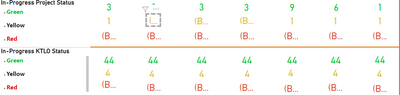
example: 

kdavidhughes_0-1659463106303.png


Helpful resources

Announcements
Power BI DataViz World Championships

Power BI Dataviz World Championships

The Power BI Data Visualization World Championships is back! Get ahead of the game and start preparing now!

December 2025 Power BI Update Carousel

Power BI Monthly Update - December 2025

Check out the December 2025 Power BI Holiday Recap!

FabCon Atlanta 2026 carousel

FabCon Atlanta 2026

Join us at FabCon Atlanta, March 16-20, for the ultimate Fabric, Power BI, AI and SQL community-led event. Save $200 with code FABCOMM.