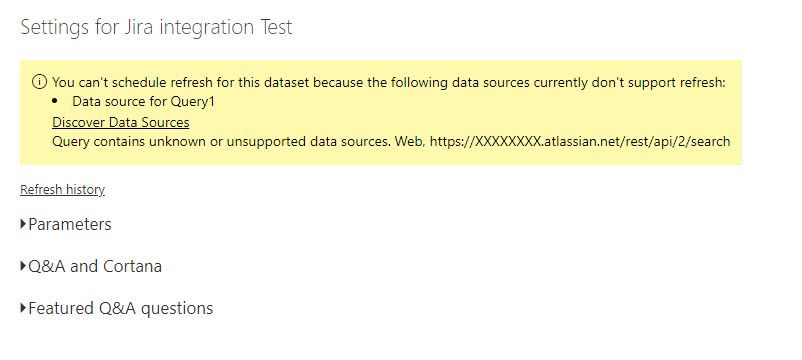
Thanks in advanced. the code below: let Source = Json.Document(Web.Contents("
https://XXX.atlassian.net/rest/api/2/search")), #"Converted to Table" = Record.ToTable(Source), #"Transposed Table" = Table.Transpose(#"Converted to Table"), #"Promoted Headers" = Table.PromoteHeaders(#"Transposed Table", [PromoteAllScalars=true]), #"Changed Type" = Table.TransformColumnTypes(#"Promoted Headers",{{"expand", type text}, {"startAt", Int64.Type}, {"maxResults", Int64.Type}, {"total", Int64.Type}, {"issues", type any}}), #"Removed Other Columns" = Table.SelectColumns(#"Changed Type",{"total"}), #"total" = #"Removed Other Columns"{0}[total], #"startAt List" = List.Generate(()=>0, each _ < #"total", each _ +100), #"Converted to Table1" = Table.FromList(#"startAt List", Splitter.SplitByNothing(), null, null, ExtraValues.Error), #"Renamed Columns" = Table.RenameColumns(#"Converted to Table1",{{"Column1", "startAt"}}), #"Added Custom" = Table.AddColumn(#"Renamed Columns", "URL", each "
https://XXX.atlassian.net/rest/api/2/search?maxResults=100&startAt=" & Text.From([startAt])), data = List.Transform(#"Added Custom"[URL], each Json.Document(Web.Contents(_))), #"Converted to Table2" = Table.FromList(data, Splitter.SplitByNothing(), null, null, ExtraValues.Error), #"Expanded Column1" = Table.ExpandRecordColumn(#"Converted to Table2", "Column1", {"expand", "startAt", "maxResults", "total", "issues"}, {"Column1.expand", "Column1.startAt", "Column1.maxResults", "Column1.total", "Column1.issues"}), #"Expanded Column1.issues" = Table.ExpandListColumn(#"Expanded Column1", "Column1.issues"), #"Expanded Column1.issues1" = Table.ExpandRecordColumn(#"Expanded Column1.issues", "Column1.issues", {"expand", "id", "self", "key", "fields"}, {"Column1.issues.expand", "Column1.issues.id", "Column1.issues.self", "Column1.issues.key", "Column1.issues.fields"}), #"Expanded Column1.issues.fields" = Table.ExpandRecordColumn(#"Expanded Column1.issues1", "Column1.issues.fields", in #"Renamed Columns1"