FabCon is coming to Atlanta
Join us at FabCon Atlanta from March 16 - 20, 2026, for the ultimate Fabric, Power BI, AI and SQL community-led event. Save $200 with code FABCOMM.
Register now!- Power BI forums
- Get Help with Power BI
- Desktop
- Service
- Report Server
- Power Query
- Mobile Apps
- Developer
- DAX Commands and Tips
- Custom Visuals Development Discussion
- Health and Life Sciences
- Power BI Spanish forums
- Translated Spanish Desktop
- Training and Consulting
- Instructor Led Training
- Dashboard in a Day for Women, by Women
- Galleries
- Data Stories Gallery
- Themes Gallery
- Contests Gallery
- QuickViz Gallery
- Quick Measures Gallery
- Visual Calculations Gallery
- Notebook Gallery
- Translytical Task Flow Gallery
- TMDL Gallery
- R Script Showcase
- Webinars and Video Gallery
- Ideas
- Custom Visuals Ideas (read-only)
- Issues
- Issues
- Events
- Upcoming Events
The Power BI Data Visualization World Championships is back! Get ahead of the game and start preparing now! Learn more
- Power BI forums
- Forums
- Get Help with Power BI
- Power Query
- Can´t I see all my Salesforce reports in Get Data
- Subscribe to RSS Feed
- Mark Topic as New
- Mark Topic as Read
- Float this Topic for Current User
- Bookmark
- Subscribe
- Printer Friendly Page


- Mark as New
- Bookmark
- Subscribe
- Mute
- Subscribe to RSS Feed
- Permalink
- Report Inappropriate Content
Can´t I see all my Salesforce reports in Get Data
Hi all,
I am a new user for Power BI. I want to connect data from Salesforce reports, but in the list I get I only find a limited number of them. The report I want to find is below 2000 rows and not stored in a private reports folder (and I get other reports stored in the same public folder as that one).
I get a message of "Search results are limited to already expanded items", what does that mean?
I have the same issue using Power Query.
Can anybody help me finding the solution?
Thanks!


- Mark as New
- Bookmark
- Subscribe
- Mute
- Subscribe to RSS Feed
- Permalink
- Report Inappropriate Content
Hi @Clarita were you able to find a solution? As a workaround, maybe you can try to test your connection with a 3rd party connector, which pulls data directly from the SF objects API. I've tried windsor.ai, supermetrics and funnel.io. I stayed with windsor because it is much cheaper so just to let you know other options. In case you wonder, to make the connection first search for the Salesforce connector in the data sources list:

After that, just grant access to your Salesforce account using your credentials, then on preview and destination page you will see a preview of your Salesforce fields:

There just select the fields you need. It is also compatible with custom fields and custom objects, so you'll be able to export them through windsor. Finally, just select PBI as your data destination and finally just copy and paste the url on PBI --> Get Data --> Web --> Paste the url.


- Mark as New
- Bookmark
- Subscribe
- Mute
- Subscribe to RSS Feed
- Permalink
- Report Inappropriate Content
Rename your report by adding "!!!!" in in front of naming string: "My_Report" -> "!!!!My_Report"
Looks simple, but it just works, solved the same issue for me.
- Mark as New
- Bookmark
- Subscribe
- Mute
- Subscribe to RSS Feed
- Permalink
- Report Inappropriate Content
Hi!
I had the same issue. There appears to be another limit in the number of reports that can be seen - in my case it stopped counting at 10 000.
In the case this is a limitation originating from Salesforce I really wish that they would scrap it, and also remove the 2000 row limitation for importaíng data from a report. The in-app treporting interface inside Salesforce is not very good so any serious analysis needs to be handled in Excel or PowerBI or similar tools.

- Mark as New
- Bookmark
- Subscribe
- Mute
- Subscribe to RSS Feed
- Permalink
- Report Inappropriate Content
Hi @Clarita,
Based on Miguel’s response in this idea, the 2000 row limit is from Salesforce Report API but not from Power BI.
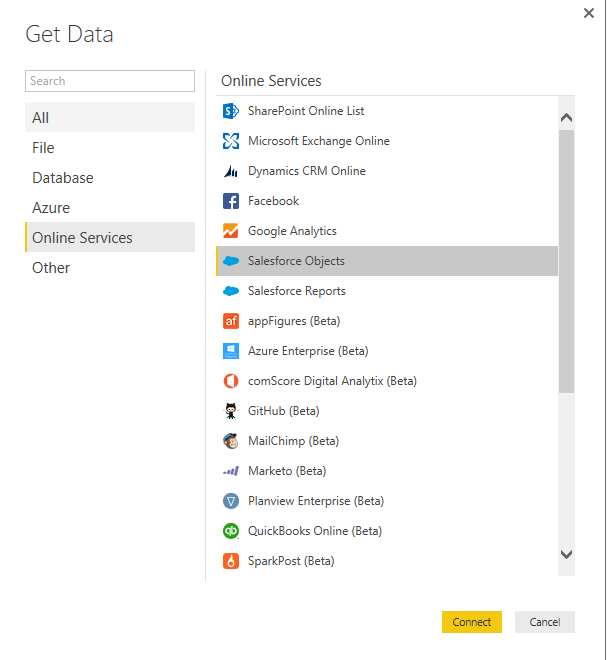
As a workaround for the above issue, you can use Salesforce Object connector in Power BI Desktop to pull all the rows from individual tables and recreate reports you’d like. The Salesforce Object connector doesn’t have the 2000 row limit.
Thanks,
Lydia Zhang
- Mark as New
- Bookmark
- Subscribe
- Mute
- Subscribe to RSS Feed
- Permalink
- Report Inappropriate Content
Many thanks, @Anonymous
The report I want to find is below 2000 rows, and I don´t even see it the Power BI search results. Is there any kind of limitations on how many reports are delivered (it only shows 10000 reports)? Which is the criteria used if that´s the case?
The workaround I used was to take another old report that appeared in the results and modify it to match the data I wanted to see, buut I would like to know why the other one (being exactly the same) does not appear in the results.
The reason I don´t use Objects is because not all the fields are available, so I need to use Reports in order to pull all the needed data.
Thanks for your help!
- Mark as New
- Bookmark
- Subscribe
- Mute
- Subscribe to RSS Feed
- Permalink
- Report Inappropriate Content
Hi @Clarita,
Based on your description, you see that a report doesn't return in the list when connecting to SalesForce reports from Power BI Desktop. According to this article, SalesForce report Rest API has the limitation that a list of up to 200 recently viewed reports can be returned, I suspect that this limitation leads to your issue.
I would also recommend you post the question in salesforce forum to get dedicated support about SalesForce report Rest API .
Thanks,
Lydia Zhang
- Mark as New
- Bookmark
- Subscribe
- Mute
- Subscribe to RSS Feed
- Permalink
- Report Inappropriate Content
Hi @Anonymous, thanks a lot for your support. I checked the article you linked, but none of the limitation is the cause. The report was for sure in the 200 recently viewed records. The workaround I used was to change one of the reports I could see to match it to the one I couldn´t, so at least I got to see the data in Power BI.
I will also check on the Salesforce.com forum.
Thanks again,
Clara
Helpful resources

Power BI Dataviz World Championships
The Power BI Data Visualization World Championships is back! Get ahead of the game and start preparing now!

Power BI Monthly Update - November 2025
Check out the November 2025 Power BI update to learn about new features.

FabCon Atlanta 2026
Join us at FabCon Atlanta, March 16-20, for the ultimate Fabric, Power BI, AI and SQL community-led event. Save $200 with code FABCOMM.


