cancel
Showing results for 
Search instead for 
Did you mean: 

The Power BI Data Visualization World Championships is back! Get ahead of the game and start preparing now! Learn more

Reply
joshua1990
Post Prodigy
Post Prodigy

Calculate working Dates between two columns

I have a simple table (1) that contains a Date column. Then I have a second table (2) that contains all holidays also on Date level.

Is there any chance to determine the number of working days - excluding holidays - between the Date column of the first table and today?

If so, how?

1 ACCEPTED SOLUTION
Fowmy
Super User
Super User

@joshua1990 

You need to add a custom column with the following M Code in Table 1.


List.Count(
            if 
                [Date] > Date.From(DateTime.LocalNow())
            then
                {}
            else
            
            List.Select(
                List.Difference(
                    List.Dates(
                        [Date],  
                        Duration.Days
                            (
                                Date.From(DateTime.LocalNow()) - [Date] 
                            ) + 1
                        ,   
                        #duration(1, 0, 0, 0)
                    ),
                    Holidays[Holiday]
                ),
                each Date.DayOfWeek(_,Day.Monday) < 6
            )
        )


 I have attached the file below.
 

Did I answer your question? Mark my post as a solution! and hit thumbs up


Subscribe and learn Power BI from these videos

Website LinkedIn PBI User Group

View solution in original post

5 REPLIES 5
CNENFRNL
Community Champion
Community Champion

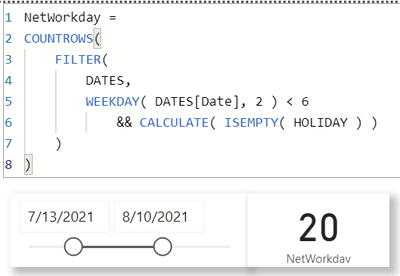
Screenshot 2021-08-08 180019.png


Thanks to the great efforts by MS engineers to simplify syntax of DAX! Most beginners are SUCCESSFULLY MISLED to think that they could easily master DAX; but it turns out that the intricacy of the most frequently used RANKX() is still way beyond their comprehension!

DAX is simple, but NOT EASY!

Anonymous
Not applicable

@CNENFRNL 


I am trying to apply your solution to a simila problem I am having. I downloaded the attachment and followed your instructions, but it is not working. Can you please explain why you create the _Measures query and how it helps?


thank you,


Fowmy
Super User
Super User

@joshua1990 

You need to add a custom column with the following M Code in Table 1.


List.Count(
            if 
                [Date] > Date.From(DateTime.LocalNow())
            then
                {}
            else
            
            List.Select(
                List.Difference(
                    List.Dates(
                        [Date],  
                        Duration.Days
                            (
                                Date.From(DateTime.LocalNow()) - [Date] 
                            ) + 1
                        ,   
                        #duration(1, 0, 0, 0)
                    ),
                    Holidays[Holiday]
                ),
                each Date.DayOfWeek(_,Day.Monday) < 6
            )
        )


 I have attached the file below.
 

Did I answer your question? Mark my post as a solution! and hit thumbs up


Subscribe and learn Power BI from these videos

Website LinkedIn PBI User Group

Thanks @Fowmy : Thanks a lot! But what is about the weekends?

I'm sorry that I missed to add this information:

Working days = Mo - Fr

@joshua1990 

I added that condition as well also, attached the file after modification. Please check my 1st reply.


Did I answer your question? Mark my post as a solution! and hit thumbs up


Subscribe and learn Power BI from these videos

Website LinkedIn PBI User Group

Helpful resources

Announcements
Power BI DataViz World Championships

Power BI Dataviz World Championships

The Power BI Data Visualization World Championships is back! Get ahead of the game and start preparing now!

November Power BI Update Carousel

Power BI Monthly Update - November 2025

Check out the November 2025 Power BI update to learn about new features.

FabCon Atlanta 2026 carousel

FabCon Atlanta 2026

Join us at FabCon Atlanta, March 16-20, for the ultimate Fabric, Power BI, AI and SQL community-led event. Save $200 with code FABCOMM.