Join us at FabCon Atlanta from March 16 - 20, 2026, for the ultimate Fabric, Power BI, AI and SQL community-led event. Save $200 with code FABCOMM.
Register now!The Power BI Data Visualization World Championships is back! Get ahead of the game and start preparing now! Learn more
Hi Everyone,
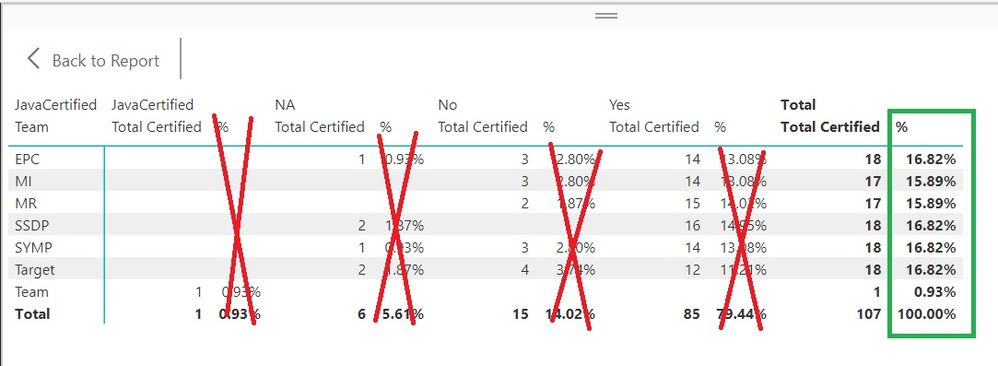
I am very new at Power BI! I have successfully shown the percentage I want; however, I only want it shown next to total, not for every column.
When I try hide the percentage columns, it hides the category. I was reading about measures, but even if I create a measure where do I apply it? I would really appreciate some step instructions 🙂
Hi @Zander ,
Currently, you need to resize the column width manually to hide it.
You could vote for these ideas to improve Power BI and make this feature coming sooner.
Hi - There is no option to Hide an aggregation using Column/Measure and show only in Total and not on Rows. What you can do is to show value on Rows as Blank and only show values on Totals by using something like below. Here [Profit Margin] is the Measure.
Profit_Margin_Disp =
IF ( HASONEVALUE ( Products[Product Name] ), BLANK (), [Profit Margin] )
Additionaly if you have fixed categories in Rows/Column, you can hide the columns in Matrix. There are numerous post available for that.
Thanks
Ankit J
You can hide the all the column except Total column.
Un-select, column width from Visualizations.
The Power BI Data Visualization World Championships is back! Get ahead of the game and start preparing now!
Check out the November 2025 Power BI update to learn about new features.
| User | Count |
|---|---|
| 10 | |
| 6 | |
| 5 | |
| 4 | |
| 2 |