Don't miss your chance to take the Fabric Data Engineer (DP-600) exam for FREE! Find out how by watching the DP-600 session on-demand now through April 28th.
Learn moreJoin the FabCon + SQLCon recap series. Up next: Power BI, Real-Time Intelligence, IQ and AI, and Data Factory take center stage. All sessions are available on-demand after the live show. Register now
Hi guys!
Trying to make Azure Analysis Services works with my Power BI, without success.
What we need:
- Azure Analysis Services working;
- Visual Studio Tabular Project Integrated with Azure;
- Power BI integrated with Azure too;
- Some gateway? Mine do not work at web and do not refresh at Desktop.
Any ideas?
Best regards,
Robson.
Hi @rgparisoto
You don't need a gateway.
How are you connecting to SSAS?
Hi @artemus !
Forgive me for answer only now, I was on a trip.
Well, to connect database, I'm using the xxx.database.windows.net. To connect to AS I'm using asazure://brazilsouth.asazure.windows.net/xxx.
I don't understand why Power BI web do not recognize the connection to AS.
It's necessary to have a gateway?
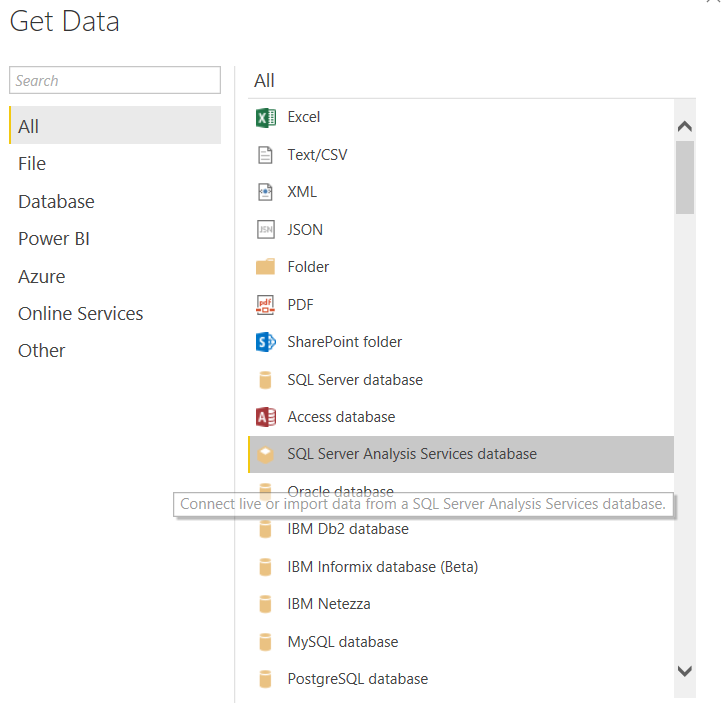
Are you using the right connector?
Hi @artemus !
I'm using this, but I have the same data, even after made some insert in the table.
I don't know if I have to make some process at Azure do start this service or something like this.
Check out the April 2026 Power BI update to learn about new features.
If you have recently started exploring Fabric, we'd love to hear how it's going. Your feedback can help with product improvements.
A new Power BI DataViz World Championship is coming this June! Don't miss out on submitting your entry.
| User | Count |
|---|---|
| 5 | |
| 3 | |
| 3 | |
| 3 | |
| 3 |
| User | Count |
|---|---|
| 8 | |
| 6 | |
| 5 | |
| 5 | |
| 4 |