cancel
Showing results for 
Search instead for 
Did you mean: 

Next up in the FabCon + SQLCon recap series: The roadmap for Microsoft SQL and Maximizing Developer experiences in Fabric. All sessions are available on-demand after the live show. Register now

Reply
Anonymous
Not applicable

Automatically adjust query with new token

Hi all,


I would like to integrate some marketing data via an API that requires a token. However, after every 30 days the token expires, so I have to keep manually adjusting the query with the new token.
I can get a new token through the API by sending my credentials using Basic Authentication. I would like to automate this process so that a new token is generated via the API when the old one expires and has not returned any data. And when refreshing the data, the new token should be used then.


Do you have any idea how I can implement this in Power Query? I would appreciate your help very much!

2 REPLIES 2
v-kkf-msft
Community Support
Community Support

Hi @Anonymous ,


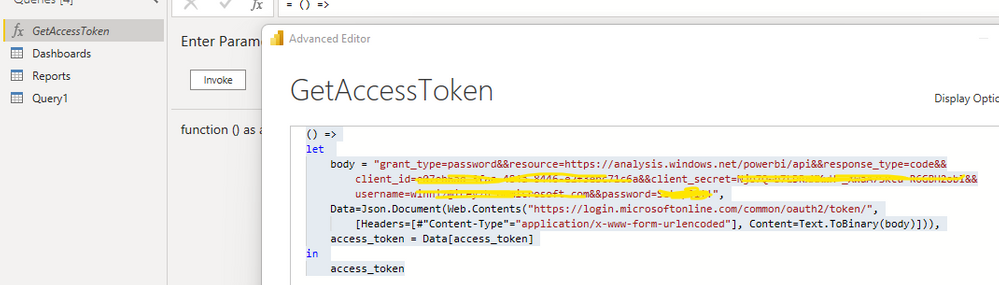
As far as I know, Power Query is able to use the Web connector to call the API to get dynamic token. Using the Power BI Rest API as an example, we can use the following code to get the token and then configure scheduled refresh on the Service.


() =>
let 
    body = "grant_type=password&&resource=https://analysis.windows.net/powerbi/api&&response_type=code&&client_id=xxxxxxxxxxx&&client_secret=xxxxxxxxx&&username=xxxxxxxx&&password=xxxxxx",
    Data=Json.Document(Web.Contents("https://login.microsoftonline.com/common/oauth2/token/",
        [Headers=[#"Content-Type"="application/x-www-form-urlencoded"], Content=Text.ToBinary(body)])),
    access_token = Data[access_token]
in 
    access_token

vkkfmsft_0-1659581246029.png


Referencing: Solved: Power BI API and scheduled refresh 


If the problem is still not resolved, please provide detailed error information or the expected result you expect. Let me know immediately, looking forward to your reply.
Best Regards,
Winniz
If this post helps, then please consider Accept it as the solution to help the other members find it more quickly.

Anonymous
Not applicable

Hello Winniz,


thank you very much for your feedback and support.


However, I'm afraid it won't solve my problem yet, so I would like to give you more detailed information:


I would like to have a solution that generates a new token from the mentioned marketing platform once the old one expires and does not retrieve any data. And this usually happens every 30 days.
However, I can only create a limited number of new tokens in a given period of time. That means I can't implement a solution in Power Query that generates a new token on every refresh (every 30 minutes automatically) before the data is retrieved, otherwise I risk being denied access to the platform or similar.
So I had thought of a solution that generates the new token, only when the old one expires (e.g. via a function like GetAccessToken), "caches" that somehow, so that the new token is taken directly at the next refresh and is not tested again for the old token. And then using the token to retrieve the data.


Do you have any idea how I can solve this with Power Query? I would be very grateful for any support!

Helpful resources

Announcements
New to Fabric survey Carousel

New to Fabric Survey

If you have recently started exploring Fabric, we'd love to hear how it's going. Your feedback can help with product improvements.

Power BI DataViz World Championships carousel

Power BI DataViz World Championships - June 2026

A new Power BI DataViz World Championship is coming this June! Don't miss out on submitting your entry.

Join our Fabric User Panel

Join our Fabric User Panel

Share feedback directly with Fabric product managers, participate in targeted research studies and influence the Fabric roadmap.

March Power BI Update Carousel

Power BI Community Update - March 2026

Check out the March 2026 Power BI update to learn about new features.