Get certified for free when you join Fabric Data Days 2026 and dive into Fabric, Power BI, SQL, AI, and other essential data skills.
Join nowData Days is here! Join us now for 60+ days of learning, challenges, and connection. Learn more
New to Power BI. I imported all my data. It took longer than I had hoped but figured now that the data was imported additional transformations/additions would go fast. I added one column to one of my tables and when I applied the changes it took a half hour to reload that table! The table was not that big - less than 1 million records.
Am I guessing I am doing something wrong? No other tool would take this long. Thanks for any help,
Z
Solved! Go to Solution.
@Anonymous,
I am afriad that there is no option to change the behavior, this behaivor is by design.
Regards,
Lydia
@Anonymous,
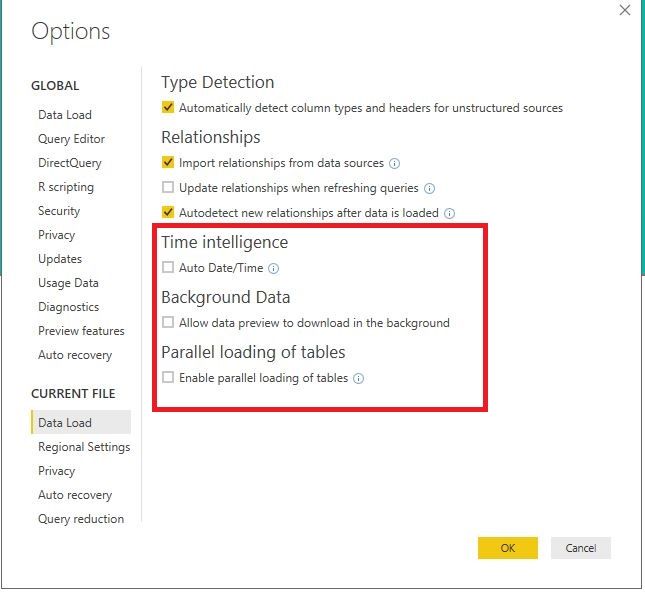
What is your data source? How many columns and rows in your tables? Please deselect the following option in the current PBIX file and check if the refresh time reduces.
Regards,
Lydia
Thanks Lydia. The table has about 800K records and 100 columns.
A question I have - I loaded from a SQL table via "Import". I was thinking that now when I refresh or apply changes that it wouldn't try to go back and reload from the SQL table since the data was already imported. But it looks like it does go back to that connection and reloads?
Steve
@Anonymous,
When you add a column to table and click refresh in Power BI Desktop, it goes back to the connection. You can use SQL Server Profiler to capture the process.
Regards,
Lydia
Doesnt that defeat the pupose of importing the data? Isn't there a way to import the data and use the data as is without having to reconnect?
Thanks for the help on this.
Steve
@Anonymous,
I am afriad that there is no option to change the behavior, this behaivor is by design.
Regards,
Lydia
Don't miss out on Data Days, June 15 through August 7. Learn Fabric, Power BI, SQL, AI and more.
Check out the May 2026 Power BI update to learn about new features.
| User | Count |
|---|---|
| 4 | |
| 4 | |
| 3 | |
| 2 | |
| 1 |
| User | Count |
|---|---|
| 11 | |
| 11 | |
| 4 | |
| 4 | |
| 4 |