Join us at FabCon Atlanta from March 16 - 20, 2026, for the ultimate Fabric, Power BI, AI and SQL community-led event. Save $200 with code FABCOMM.
Register now!View all the Fabric Data Days sessions on demand. View schedule
Hello,
I need to append two data sources into one. The problem is that I need to get all data from first data source and only get that data from the second data source that does not exist in the first data source.
Data sources have different primary keys i.e.:
first data source: 00001#D, 00002#D, 00003#D
second data source: 00001#E, 00002#E, 00004#E
In the appended table i need to have these primary keys: 00001#D, 00002#D, 00003#D, 00004#E
I need to use similar function like in SQL - Where Exists
Solved! Go to Solution.
Hi @MK97
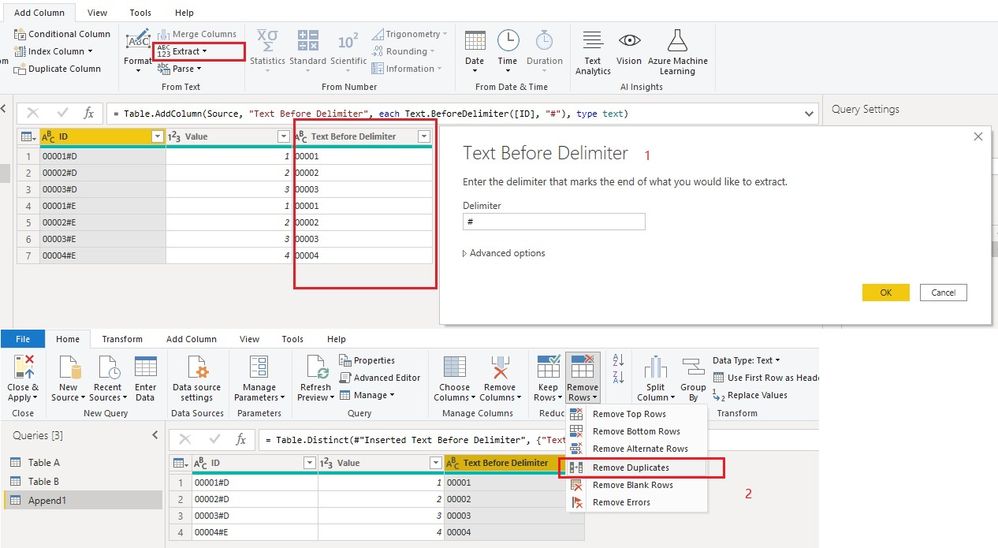
First append two tables. Ensure the first data source table comes ahead in Table.Combine. Then extract id numbers before "#" into a new column. Select this new column and remove duplicates.
let
Source = Table.Combine({#"Table A", #"Table B"}),
#"Inserted Text Before Delimiter" = Table.AddColumn(Source, "Text Before Delimiter", each Text.BeforeDelimiter([ID], "#"), type text),
#"Removed Duplicates" = Table.Distinct(#"Inserted Text Before Delimiter", {"Text Before Delimiter"})
in
#"Removed Duplicates"
Best Regards,
Community Support Team _ Jing
If this post helps, please Accept it as Solution to help other members find it.
Hi @MK97
First append two tables. Ensure the first data source table comes ahead in Table.Combine. Then extract id numbers before "#" into a new column. Select this new column and remove duplicates.
let
Source = Table.Combine({#"Table A", #"Table B"}),
#"Inserted Text Before Delimiter" = Table.AddColumn(Source, "Text Before Delimiter", each Text.BeforeDelimiter([ID], "#"), type text),
#"Removed Duplicates" = Table.Distinct(#"Inserted Text Before Delimiter", {"Text Before Delimiter"})
in
#"Removed Duplicates"
Best Regards,
Community Support Team _ Jing
If this post helps, please Accept it as Solution to help other members find it.
You can you the Merge function in the GUI, and choose Left Anti as the Join Kind. Then append this step to the step right before the join.
--Nate
Check out the November 2025 Power BI update to learn about new features.
Advance your Data & AI career with 50 days of live learning, contests, hands-on challenges, study groups & certifications and more!
| User | Count |
|---|---|
| 12 | |
| 7 | |
| 5 | |
| 5 | |
| 3 |