We've captured the moments from FabCon & SQLCon that everyone is talking about, and we are bringing them to the community, live and on-demand. Starts on April 14th. Register now
I am doing analysis of duplicate entries for a survey. I want to analyse the duplicates to determine which one to keep before deleting the rest of the entries.
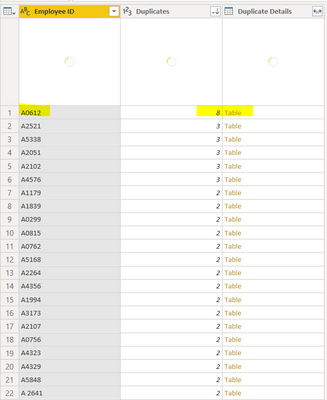
I was able to learn how to group the entries by the unique staff ID, and using the count row function i got this screen below:
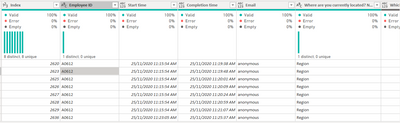
My next step was to click the individual entries (example: A0612) to see all the duplicate entries. In the example below, I have one unique staff ID with 8 entries. This could have been because the staff submitted multiple survey responses.
Question:
1. I have over 30 columns. How do i quickly analyse the similarities of row entries? My initial thought was to unpivot the other columns, and compare the values for each attribute column headers. But is there an easier method than this?
2. After I have decided which duplicates to delete, how do i ensure these changes get reflected in the master sheet? The long method would be for me to manually delete each row one by one. Is there a faster way around this?
You can use Table.FuzzyGroup to accomplish this. This function will group similar column values together.
Start by unpivoting the data into attribute/value pairs (Question/value)
Then do a group on all the columns with a count rows
Finally, replace the Table.Group function with Table.FuzzyGroup function.
If you have recently started exploring Fabric, we'd love to hear how it's going. Your feedback can help with product improvements.
A new Power BI DataViz World Championship is coming this June! Don't miss out on submitting your entry.
Share feedback directly with Fabric product managers, participate in targeted research studies and influence the Fabric roadmap.
| User | Count |
|---|---|
| 5 | |
| 3 | |
| 3 | |
| 2 | |
| 2 |
| User | Count |
|---|---|
| 11 | |
| 10 | |
| 7 | |
| 7 | |
| 6 |