cancel
Showing results for 
Search instead for 
Did you mean: 

Get Fabric Certified for FREE during Fabric Data Days. Don't miss your chance! Request now

Reply
Structuralguy
Frequent Visitor

Aggregate 5 minute time stamps to half hour values in datetime format

I currently have data separated into 5 minute time stamps across two years worth of recordings (see below).


Structuralguy_0-1632217082590.png

I need to adjust this data to display half hour time stamps (every 30 minutes and on the hour) and replace values from 5 minutes to 55 minutes past the hour. The first 6 recording intervals (:05-:30) need to be rounded up to the half hour value, whilst the second 6 recording intervals (:035-:00) need to be rounded up to the hour value. An example of what the data should look like is given below. 

Structuralguy_1-1632217106560.png

Is it possible to do this using power query whilst keeping the DateTime format?


1 ACCEPTED SOLUTION
Vera_33
Resident Rockstar
Resident Rockstar

Hi @Structuralguy 


Yes, there should be different ways, here is one way to extract date, hour, minute, paste all in the Advanced Editor via blank query, you will see the result
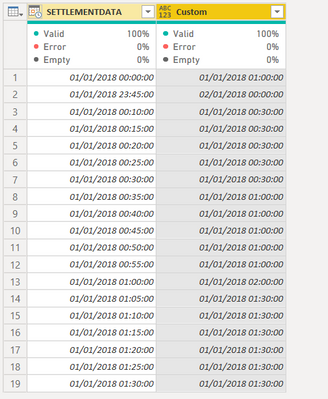
Vera_33_0-1632223051879.png


let
    Source = Table.FromRows(Json.Document(Binary.Decompress(Binary.FromText("bc+xCcAwDETRVYLrQHSSBcGrGO+/Rux0iT+oOl6h33sxXfPcdB9mzayM8zN6tJr/cUptco0knaSTDJJBspLEP5Nk7lLQvkaS0C5qF7WL2vW2jwc=", BinaryEncoding.Base64), Compression.Deflate)), let _t = ((type nullable text) meta [Serialized.Text = true]) in type table [SETTLEMENTDATA = _t]),
    #"Changed Type" = Table.TransformColumnTypes(Source,{{"SETTLEMENTDATA", type datetime}}),
    #"Added Custom" = Table.AddColumn(#"Changed Type", "Custom", each [min=Time.Minute([SETTLEMENTDATA]),
hr = Time.Hour([SETTLEMENTDATA]),
a= if min > 0 and min <= 30 then 30 else 0,
b=if min > 0 and min <= 30 then Date.From([SETTLEMENTDATA]) & #time(hr,a,0) else Date.From([SETTLEMENTDATA]) & #time(hr+1,a,0) ][b])
in
    #"Added Custom"


View solution in original post

4 REPLIES 4
Vera_33
Resident Rockstar
Resident Rockstar

Hi @Structuralguy 


Yes, there should be different ways, here is one way to extract date, hour, minute, paste all in the Advanced Editor via blank query, you will see the result

Vera_33_0-1632223051879.png


let
    Source = Table.FromRows(Json.Document(Binary.Decompress(Binary.FromText("bc+xCcAwDETRVYLrQHSSBcGrGO+/Rux0iT+oOl6h33sxXfPcdB9mzayM8zN6tJr/cUptco0knaSTDJJBspLEP5Nk7lLQvkaS0C5qF7WL2vW2jwc=", BinaryEncoding.Base64), Compression.Deflate)), let _t = ((type nullable text) meta [Serialized.Text = true]) in type table [SETTLEMENTDATA = _t]),
    #"Changed Type" = Table.TransformColumnTypes(Source,{{"SETTLEMENTDATA", type datetime}}),
    #"Added Custom" = Table.AddColumn(#"Changed Type", "Custom", each [min=Time.Minute([SETTLEMENTDATA]),
hr = Time.Hour([SETTLEMENTDATA]),
a= if min > 0 and min <= 30 then 30 else 0,
b=if min > 0 and min <= 30 then Date.From([SETTLEMENTDATA]) & #time(hr,a,0) else Date.From([SETTLEMENTDATA]) & #time(hr+1,a,0) ][b])
in
    #"Added Custom"


Hi @Vera_33 


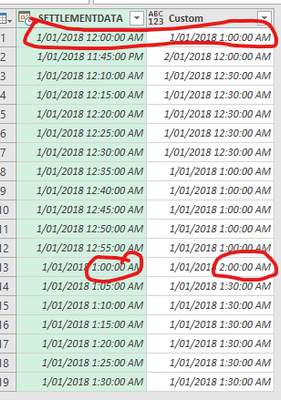
Thanks very much for your help! I've tried the code and it works almost perfectly, only issue is with the timestamps that already correlate to the exact hour as they are currently being adjusted an extra hour forward (see screenshot below). I've managed to fix this however by just adding an extra 'else if' statement as follows:

else if min = 0 then Date.From([SETTLEMENTDATA]) & #time(hr,a,0)


Thanks once again for your help!


Structuralguy_0-1632291745643.png


Greg_Deckler
Community Champion
Community Champion

@Structuralguy Probably better ways to do this but I did it like this:

let
    Source = Table.FromRows(Json.Document(Binary.Decompress(Binary.FromText("i45WMtQ31DcyMLRQMLAyMFCK1UEVMUUXMcRQY4QhYowhYoJhjimaGkMM2w0xbDcEmxMLAA==", BinaryEncoding.Base64), Compression.Deflate)), let _t = ((type nullable text) meta [Serialized.Text = true]) in type table [Column1 = _t]),
    #"Changed Type" = Table.TransformColumnTypes(Source,{{"Column1", type datetime}}),
    #"Added Custom" = Table.AddColumn(#"Changed Type", "Custom", each DateTime.Date([Column1])),
    #"Renamed Columns" = Table.RenameColumns(#"Added Custom",{{"Custom", "Date"}}),
    #"Added Custom1" = Table.AddColumn(#"Renamed Columns", "Hours", each Time.Hour([Column1])),
    #"Added Custom2" = Table.AddColumn(#"Added Custom1", "Minutes", each if Time.Minute([Column1]) <= 30 then 30 else 0),
    #"Added Custom3" = Table.AddColumn(#"Added Custom2", "Final", each DateTime.From(Date.ToText([Date]) & " " & Text.From([Hours]) & ":" & Text.From([Minutes])))
in
    #"Added Custom3"


Follow on LinkedIn
@ me in replies or I'll lose your thread!!!
Instead of a Kudo, please vote for this idea
Become an expert!: Enterprise DNA
External Tools: MSHGQM
YouTube Channel!: Microsoft Hates Greg
Latest book!:
DAX For Humans

DAX is easy, CALCULATE makes DAX hard...

Hi @Greg_Deckler 


Thanks very much for your reply. 


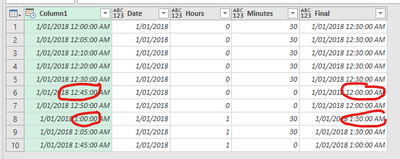
I gave your code a shot but still a couple of bugs regarding rounding up to the next hour value once the timestamp was over 35minutes past the hour and rounding up to half past the hour for exact hour timestamps (see screenshot below).


Thanks for your time and help with this though!

Structuralguy_0-1632292004722.png


Helpful resources

Announcements
November Power BI Update Carousel

Power BI Monthly Update - November 2025

Check out the November 2025 Power BI update to learn about new features.

Fabric Data Days Carousel

Fabric Data Days

Advance your Data & AI career with 50 days of live learning, contests, hands-on challenges, study groups & certifications and more!

FabCon Atlanta 2026 carousel

FabCon Atlanta 2026

Join us at FabCon Atlanta, March 16-20, for the ultimate Fabric, Power BI, AI and SQL community-led event. Save $200 with code FABCOMM.