cancel
Showing results for 
Search instead for 
Did you mean: 

Data Days is here! Join us now for 60+ days of learning, challenges, and connection. Learn more

Reply
Anonymous
Not applicable

Advanced Editor - Error

Hi All, 


I have this code below. I am not sure how to get rid of the Errors. 

I want all (Blank) to just say Blank and null to say N/A


let
Source = #"FACT TABLE",
#"Detected Type Mismatches" = let
tableWithOnlyPrimitiveTypes = Table.SelectColumns(Source, Table.ColumnsOfType(Source, {type nullable number, type nullable text, type nullable logical, type nullable date, type nullable datetime, type nullable datetimezone, type nullable time, type nullable duration})),
recordTypeFields = Type.RecordFields(Type.TableRow(Value.Type(tableWithOnlyPrimitiveTypes))),
fieldNames = Record.FieldNames(recordTypeFields),
fieldTypes = List.Transform(Record.ToList(recordTypeFields), each [Type]),
pairs = List.Transform(List.Positions(fieldNames), (i) => {fieldNames{i}, (v) => if v = null or Value.Is(v, fieldTypes{i}) then v else error [Message = "The type of the value does not match the type of the column.", Detail = v], fieldTypes{i}})
in
Table.TransformColumns(Source, pairs),
#"Added Index" = Table.AddIndexColumn(#"Detected Type Mismatches", "Row Number" ,1),
#"Kept Errors" = Table.SelectRowsWithErrors(#"Added Index", {"Source.Name", "SDR ID", "Site", "Card number", "CP ID", "Connector", "Charger Type", "Amount", "Consum(kWh)", "Duration", "Start Date", "Start Time", "End Date", "End Time", "Payment Status", "Start Hour", "Payment Method"}),
#"Reordered Columns" = Table.ReorderColumns(#"Kept Errors", {"Row Number", "Source.Name", "SDR ID", "Site", "Card number", "CP ID", "Connector", "Charger Type", "Amount", "Consum(kWh)", "Duration", "Start Date", "Start Time", "End Date", "End Time", "Payment Status", "Start Hour", "Payment Method"})


I highly appreciate any help with this. 

Thank you, 

jiCAT

in
#"Reordered Columns"

1 ACCEPTED SOLUTION
jennratten
Super User
Super User

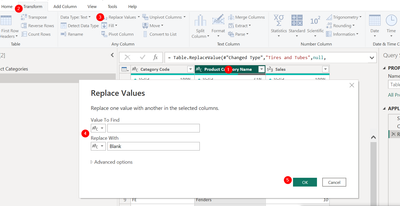
Hello - it looks like the script you are showing here is for the errors table that Power Query creates instead of the actual data table with th errors.  Below is how you can replace blanks with Blank and nulls with N/A.  You will need to do this on the actual data table.


  1. Select the column containing the values to be replaced.
  2. Either right-click on the column or go to the ribbon.
  3. Choose replace values.
  4. Enter the old value (don't enter anything to replace blanks, type the word null to replace nulls) and the new value (Blank or N/A).
  5. Click Okay.

Replace Blanks:

jennratten_0-1671531669115.png


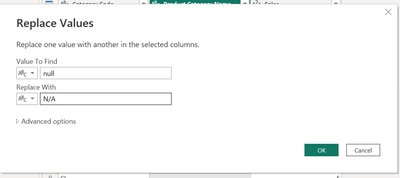
Replace Nulls:

jennratten_1-1671531706620.png


View solution in original post

2 REPLIES 2
jennratten
Super User
Super User

Hello - it looks like the script you are showing here is for the errors table that Power Query creates instead of the actual data table with th errors.  Below is how you can replace blanks with Blank and nulls with N/A.  You will need to do this on the actual data table.


  1. Select the column containing the values to be replaced.
  2. Either right-click on the column or go to the ribbon.
  3. Choose replace values.
  4. Enter the old value (don't enter anything to replace blanks, type the word null to replace nulls) and the new value (Blank or N/A).
  5. Click Okay.

Replace Blanks:

jennratten_0-1671531669115.png


Replace Nulls:

jennratten_1-1671531706620.png


Anonymous
Not applicable

Thank you @jennratten, 

It worked magic. I must remember to use the simplest solution first. 
Much appreciate your help. 
Best, 
jiCAT

Helpful resources

Announcements
Fabric Data Days is here Carousel

Fabric Data Days 2026

Don't miss out on Data Days, June 15 through August 7. Learn Fabric, Power BI, SQL, AI and more.

May Power BI Update Carousel

Power BI Monthly Update - May 2026

Check out the May 2026 Power BI update to learn about new features.

Power BI DataViz World Championships carousel

Power BI DataViz World Championships - June 2026

A new Power BI DataViz World Championship is coming this June! Don't miss out on submitting your entry.