FabCon is coming to Atlanta
Join us at FabCon Atlanta from March 16 - 20, 2026, for the ultimate Fabric, Power BI, AI and SQL community-led event. Save $200 with code FABCOMM.
Register now!- Power BI forums
- Get Help with Power BI
- Desktop
- Service
- Report Server
- Power Query
- Mobile Apps
- Developer
- DAX Commands and Tips
- Custom Visuals Development Discussion
- Health and Life Sciences
- Power BI Spanish forums
- Translated Spanish Desktop
- Training and Consulting
- Instructor Led Training
- Dashboard in a Day for Women, by Women
- Galleries
- Data Stories Gallery
- Themes Gallery
- Contests Gallery
- QuickViz Gallery
- Quick Measures Gallery
- Visual Calculations Gallery
- Notebook Gallery
- Translytical Task Flow Gallery
- TMDL Gallery
- R Script Showcase
- Webinars and Video Gallery
- Ideas
- Custom Visuals Ideas (read-only)
- Issues
- Issues
- Events
- Upcoming Events
The Power BI Data Visualization World Championships is back! Get ahead of the game and start preparing now! Learn more
- Power BI forums
- Forums
- Get Help with Power BI
- Power Query
- Address having 2 or more Zipcode
- Subscribe to RSS Feed
- Mark Topic as New
- Mark Topic as Read
- Float this Topic for Current User
- Bookmark
- Subscribe
- Printer Friendly Page


- Mark as New
- Bookmark
- Subscribe
- Mute
- Subscribe to RSS Feed
- Permalink
- Report Inappropriate Content
Address having 2 or more Zipcode
Dear community,
I just can't figure out how to create a table just like the one below.
I want to identify anomalies in our customer database.
Each address should have a unique Zipcode but I found some having more than 1.
I have a dataset of more then 30K records, so it cannot be done manually.
How can I use PowerQuery to create this table???
Thank you for your support
Address #record in dataset #of different Zipcode
ABC 3 1
CDE 14 3
FGH 10 1
...
Solved! Go to Solution.

- Mark as New
- Bookmark
- Subscribe
- Mute
- Subscribe to RSS Feed
- Permalink
- Report Inappropriate Content
Hi @DanFromMontreal ,
I created a data sample:
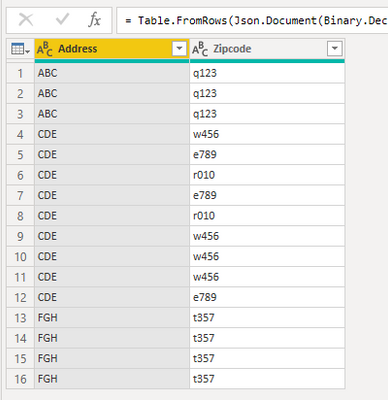
Please simply use "Group by" to get the count and distinctCount:
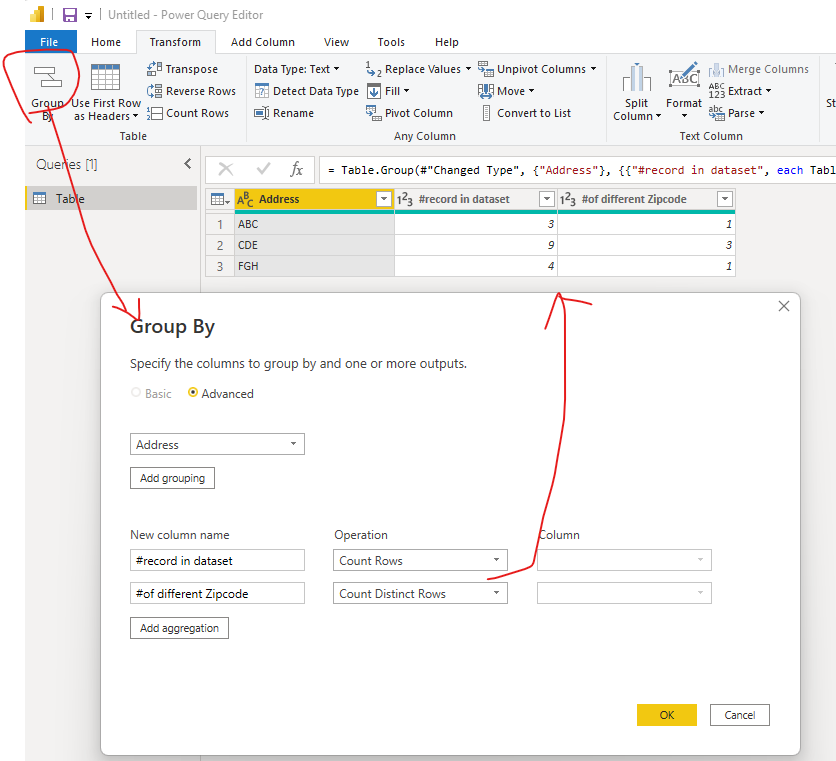
Best Regards,
Eyelyn Qin
If this post helps, then please consider Accept it as the solution to help the other members find it more quickly.
- Mark as New
- Bookmark
- Subscribe
- Mute
- Subscribe to RSS Feed
- Permalink
- Report Inappropriate Content
try this
let
    Origine = Table.FromRows(Json.Document(Binary.Decompress(Binary.FromText("i45WSlTSUTIEYUOlWJ1opSQg0wiEjcDcZCDTGISNwVyYYiOoNIhvAsImcM3mQGxqCuamAplmIGyGImturhQbCwA=", BinaryEncoding.Base64), Compression.Deflate)), let _t = ((type nullable text) meta [Serialized.Text = true]) in type table [address = _t, zipcode = _t, otherthink = _t]),
    #"Modificato tipo" = Table.TransformColumnTypes(Origine,{{"address", type text}, {"zipcode", Int64.Type}, {"otherthink", Int64.Type}}),
    #"Raggruppate righe" = Table.Group(#"Modificato tipo", {"address"}, { {"ziplist", each List.Count(List.Distinct([zipcode]))}})
in
    #"Raggruppate righe"
PS
what you have left out is to load an example table with the starting data and a table with the desired result
- Mark as New
- Bookmark
- Subscribe
- Mute
- Subscribe to RSS Feed
- Permalink
- Report Inappropriate Content
Hi @DanFromMontreal ,
I created a data sample:
Please simply use "Group by" to get the count and distinctCount:
Best Regards,
Eyelyn Qin
If this post helps, then please consider Accept it as the solution to help the other members find it more quickly.
- Mark as New
- Bookmark
- Subscribe
- Mute
- Subscribe to RSS Feed
- Permalink
- Report Inappropriate Content
Great explanation @Anonymous
If I understand correctly, it works only if there is only 2 columns in my table (Address, Zipcode).
My table has 10 different columns. I had to remove all of them and keep only the Address & Zipcode to make it work.
What if I wanted to add a column to have a Distinct count from another column, such as Customer?
The aggregate function would not work
#Address #Record in dataset #Distinct Zipcode #Distinct Customer
Regards,
- Mark as New
- Bookmark
- Subscribe
- Mute
- Subscribe to RSS Feed
- Permalink
- Report Inappropriate Content
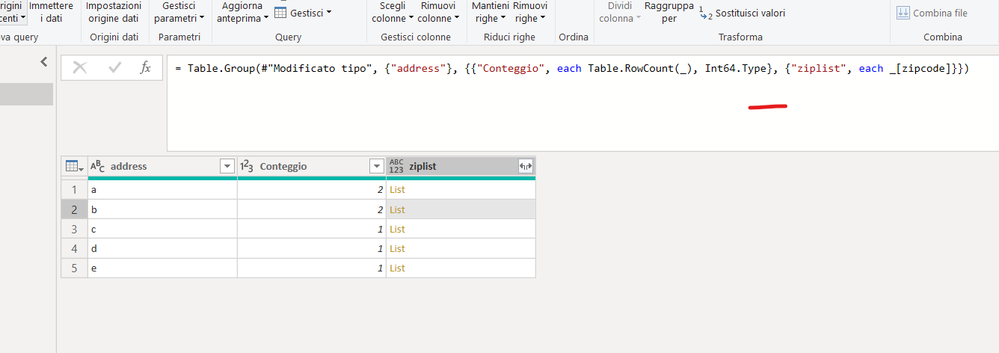
let
    Origine = Table.FromRows(Json.Document(Binary.Decompress(Binary.FromText("Pcy5DQAwCEPRXVynyUWGQRS59l8hmCLFk74lhComEjJlWFIsz0Il5vasVGPyuFGLeTw79ZjXU0j+q0EDZg8=", BinaryEncoding.Base64), Compression.Deflate)), let _t = ((type nullable text) meta [Serialized.Text = true]) in type table [address = _t, zipcode = _t, otherthink = _t]),
    #"Modificato tipo" = Table.TransformColumnTypes(Origine,{{"address", type text}, {"zipcode", Int64.Type}, {"otherthink", Int64.Type}}),
    #"Raggruppate righe" = Table.Group(#"Modificato tipo", {"address"}, {{"Conteggio", each Table.RowCount(_), Int64.Type}, {"ziplist", each _[zipcode]}})
in
    #"Raggruppate righe"
- Mark as New
- Bookmark
- Subscribe
- Mute
- Subscribe to RSS Feed
- Permalink
- Report Inappropriate Content
Rocco,
Tested your solution and it does not fully answer my need.
I was able to regroup to obtain the number of record in dataset (conteggio).
But the part of having the number of DIFFERENT zipcode for each address, that, your solution does not provide.
Again, in my example, for the address CDE, there is 14 records and out of those 14 addresses, there is 3 different zipcode associated to it.
Am I missing something?
Thank you for your support.
- Mark as New
- Bookmark
- Subscribe
- Mute
- Subscribe to RSS Feed
- Permalink
- Report Inappropriate Content
try this
let
    Origine = Table.FromRows(Json.Document(Binary.Decompress(Binary.FromText("i45WSlTSUTIEYUOlWJ1opSQg0wiEjcDcZCDTGISNwVyYYiOoNIhvAsImcM3mQGxqCuamAplmIGyGImturhQbCwA=", BinaryEncoding.Base64), Compression.Deflate)), let _t = ((type nullable text) meta [Serialized.Text = true]) in type table [address = _t, zipcode = _t, otherthink = _t]),
    #"Modificato tipo" = Table.TransformColumnTypes(Origine,{{"address", type text}, {"zipcode", Int64.Type}, {"otherthink", Int64.Type}}),
    #"Raggruppate righe" = Table.Group(#"Modificato tipo", {"address"}, { {"ziplist", each List.Count(List.Distinct([zipcode]))}})
in
    #"Raggruppate righe"
PS
what you have left out is to load an example table with the starting data and a table with the desired result
Helpful resources

Power BI Dataviz World Championships
The Power BI Data Visualization World Championships is back! Get ahead of the game and start preparing now!

Power BI Monthly Update - December 2025
Check out the December 2025 Power BI Holiday Recap!

FabCon Atlanta 2026
Join us at FabCon Atlanta, March 16-20, for the ultimate Fabric, Power BI, AI and SQL community-led event. Save $200 with code FABCOMM.


