Don't miss your chance to take the Fabric Data Engineer (DP-700) exam on us!
Learn moreNext up in the FabCon + SQLCon recap series: The roadmap for Microsoft SQL and Maximizing Developer experiences in Fabric. All sessions are available on-demand after the live show. Register now
I am tyring to get to AD object propertiese and am wondering if there is "Table Map" of some sort that I can reference to find where \ how I can get to certain propertiese ?
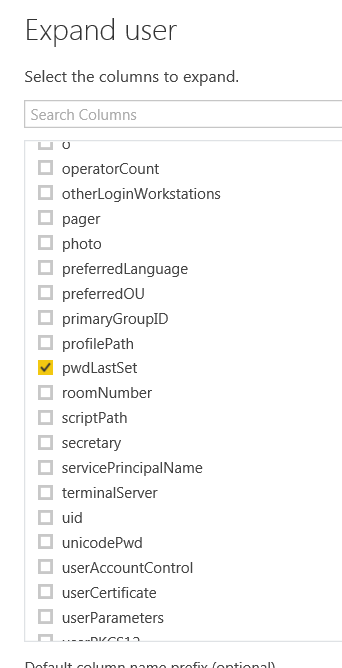
I.e. I figured out I needed to Expand the user column to get to home Drive, mail and principal name information
I am not currently finding the right table\columns with information that identifies "contact" vs. "user" objects ?
Or identifies disabled vs. enabled objects ?
I have been going through the "Computer" "User" & "Contact" tables and so far have not seen this information.
I can get this information easily through PowerShell but getting into the PowerBI Desktop tool is my current need.
I am new to PowerBI so please excuse what might be a very simple question.
thanks
I think I am on the right track in trying to look for Attributes in the AD Schema.
https://msdn.microsoft.com/en-us/library/ms675090(v=vs.85).aspx
I.e. ms-DS-User-Account-Disabled attribute
https://msdn.microsoft.com/en-us/library/ms677836(v=vs.85).aspx
But I am so far unable to find this under the "User" or "Contact" table 😞
Any help would be appriciated.
Hi @AvcRomeo,
As we know, the Power BI Desktop is used for retrieving data from the Active Directory data source. The tables available in desktop is generated automatically when we connect to Active Directory, which are determined by the Active Directory settings. I would suggest you contact the system administrator to check which table stores required information. And try to use system administrator account to retrieve Active Directory data.
Best Regards,
Qiuyun Yu
Hi @v-qiuyu-msft,
Thanks for responding.
Do you have any suggestion for what tables sources to look for ?
I am using an admin account to retreive data.
The following is an example of the data I am seeing.
If you have recently started exploring Fabric, we'd love to hear how it's going. Your feedback can help with product improvements.
A new Power BI DataViz World Championship is coming this June! Don't miss out on submitting your entry.
Share feedback directly with Fabric product managers, participate in targeted research studies and influence the Fabric roadmap.
| User | Count |
|---|---|
| 6 | |
| 4 | |
| 3 | |
| 3 | |
| 2 |
| User | Count |
|---|---|
| 7 | |
| 6 | |
| 5 | |
| 5 | |
| 5 |