Join us at FabCon Atlanta from March 16 - 20, 2026, for the ultimate Fabric, Power BI, AI and SQL community-led event. Save $200 with code FABCOMM.
Register now!Vote for your favorite vizzies from the Power BI Dataviz World Championship submissions. Vote now!
I have noticed an error on my dashboards with the slicer tool. Previously I could select multiple options on the slicer, now I can only select one at a time.
The same issue is also occurring in the web app. I have to hold down the control button to select multiple options in a slicer.
Is this being looked at?
Solved! Go to Solution.
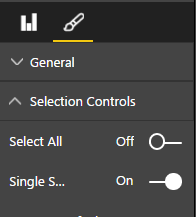
To be able to select multiple options within the slicer tool you need to go to reports in the web app, edit, and then select the slicer and go to the format pane and de-select selection controls single.
And where can I find this slicer format option in Powerbi designer ?
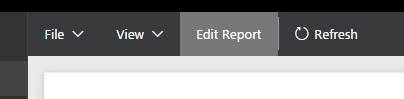
Click on the edit report button within the web app:
Then select the slicer within the report you want to change. Then click the format pane button (the paintbrush) and open selection criteria tab and make the required change:
Vote for your favorite vizzies from the Power BI World Championship submissions!
If you love stickers, then you will definitely want to check out our Community Sticker Challenge!
Check out the January 2026 Power BI update to learn about new features.