FabCon is coming to Atlanta
Join us at FabCon Atlanta from March 16 - 20, 2026, for the ultimate Fabric, Power BI, AI and SQL community-led event. Save $200 with code FABCOMM.
Register now!- Power BI forums
- Get Help with Power BI
- Desktop
- Service
- Report Server
- Power Query
- Mobile Apps
- Developer
- DAX Commands and Tips
- Custom Visuals Development Discussion
- Health and Life Sciences
- Power BI Spanish forums
- Translated Spanish Desktop
- Training and Consulting
- Instructor Led Training
- Dashboard in a Day for Women, by Women
- Galleries
- Data Stories Gallery
- Themes Gallery
- Contests Gallery
- QuickViz Gallery
- Quick Measures Gallery
- Visual Calculations Gallery
- Notebook Gallery
- Translytical Task Flow Gallery
- TMDL Gallery
- R Script Showcase
- Webinars and Video Gallery
- Ideas
- Custom Visuals Ideas (read-only)
- Issues
- Issues
- Events
- Upcoming Events
The Power BI Data Visualization World Championships is back! Get ahead of the game and start preparing now! Learn more
- Power BI forums
- Forums
- Get Help with Power BI
- Mobile Apps
- Re: Dashboards not refreshing in Power BI mobile a...
- Subscribe to RSS Feed
- Mark Topic as New
- Mark Topic as Read
- Float this Topic for Current User
- Bookmark
- Subscribe
- Printer Friendly Page

- Mark as New
- Bookmark
- Subscribe
- Mute
- Subscribe to RSS Feed
- Permalink
- Report Inappropriate Content
Dashboards not refreshing in Power BI mobile app on iPhone
Is anyone else experiencing issues with Power BI Mobile app (Version 10.4) on iPhone IOS 10.2...
Our customers LOVE the SSRS Mobile Dashboards as much as we do.. however, the Dashboards are not refreshing the Data and some are not showing any data at all.. The same Dashboards can be accessed from Safari URL on the iPhone and they work perfectly.
How can I attempt to debug this? Some background is that the Dashboards were created from the Upload functionality, which is a bit awkward right now because since I uploaded the same Dashboards into multiple folders, it appears that SSRS Mobile reports must be storing the GUID of the Dataset with the Download version of the dashboard because I have to add the Dataset uploaded in the new folder and reconnect each control to the new dataset.. Sorry, you may or may not know what I am rambling on about, but I give you this background because it may be the cause of the dataset data not being refreshed by Power BI?
Please HELP... we have deployed these dashboards to our customers who want to access them from their iPhones via the Power BI app.. I don't want to have to tell them to use Safari and skip Power BI...
If you need any more information, I will be glad to provide anything to help figure this out..
Thanks,
Diane
Solved! Go to Solution.
- Mark as New
- Bookmark
- Subscribe
- Mute
- Subscribe to RSS Feed
- Permalink
- Report Inappropriate Content
I thought I would let you know that Version 10.7 of Power BI on my iPhone, seems to have fixed this issue.
Now my Dashboards are refreshing with the correct data as expected.
Not sure if you fixed something or if someone else fixed something that made the refresh start working..
Happy New Year!
Thanks,
Diane


- Mark as New
- Bookmark
- Subscribe
- Mute
- Subscribe to RSS Feed
- Permalink
- Report Inappropriate Content
Hi. I'm Erez, a software engineer working with the Power BI Mobile iOS team.
Sorry to hear about your trouble with our app.
Can you please provide some repro steps to the problem you're facing?
(like, the kind of dataset used - shared/embedded).
What did you mean by reconnecting each control to the new dataset?
Thanks!
- Mark as New
- Bookmark
- Subscribe
- Mute
- Subscribe to RSS Feed
- Permalink
- Report Inappropriate Content
Can you also try with the Windows Universal Power BI app on your Windows 10 machine (in case you have one) or Android app?
- Mark as New
- Bookmark
- Subscribe
- Mute
- Subscribe to RSS Feed
- Permalink
- Report Inappropriate Content
Hi Erez,
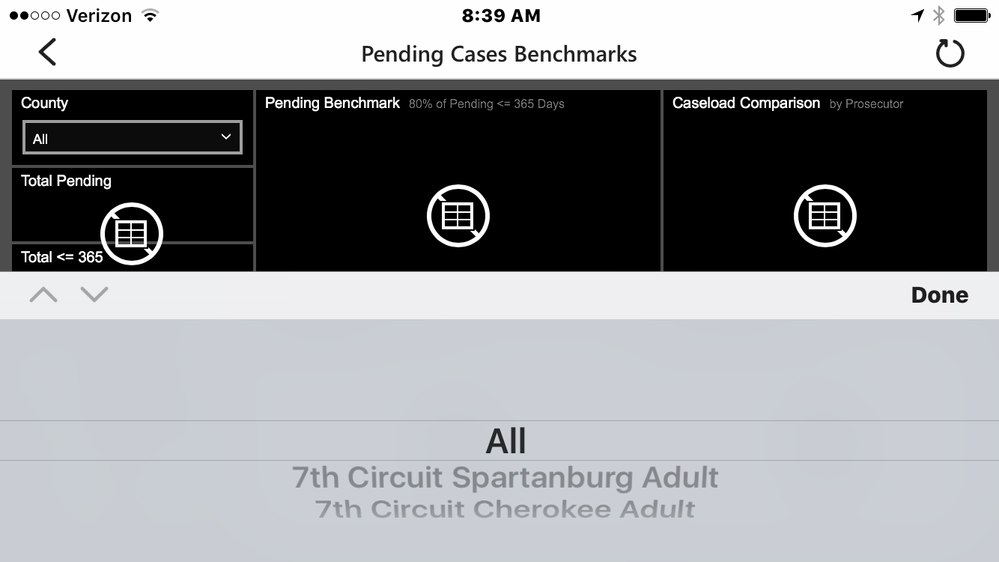
I downloaded the Power BI app for Windows 10 this morning and I am experiencing the same issue as I am with the iPhone Power BI application. I am only using Shared Datasets in the dashboards. I can tell that the correct dataset is being used because one of the controls (Select List for County) has the correct information, however, none of the other controls are loaded.
What I mean by re-attaching the controls - I have a requirement to supply the same Dashboards for multiple environments. The way I am "deploying" them currently is very manual. I upload them to the same folder structure that I developed them, meaning the same folder names.. then I "Move" the uploaded Datasets and Dashboards to another folder. I then upload the dataasets and dashboards again and "move" them to another folder, etc. I found out that the dashboards were still "attached" to the original folder datasets that I uploaded the datasets and dashboards totally by accident. When I changed the datasource in the original folder then all the dashboards in the other folders displayed the data referenced by the original upload folder datasource. I then figured out that if I modified the dashboards in their New Folder location via Mobile Report Publisher, by going to the Data tab and adding the datasets which are in the New Folder creating a "dataset2" version and selecting each control and selecting the "dataset2" version of the dataset then the correct data started displaying. This is very time consuming and I plan to post an enhancement request with SSRS, but had to get the dashboards deployed to our customers. Hope this helps explain your questions, if not then feel free to contact me again for further explaination.
Thanks, Diane


- Mark as New
- Bookmark
- Subscribe
- Mute
- Subscribe to RSS Feed
- Permalink
- Report Inappropriate Content
This helps explaining the situation.
Thanks a lot for the detailed information!
I'll try to reproduce the problem and find a fix for that in our systems and will update once I'll have some findings.
- Mark as New
- Bookmark
- Subscribe
- Mute
- Subscribe to RSS Feed
- Permalink
- Report Inappropriate Content
I thought I would let you know that Version 10.7 of Power BI on my iPhone, seems to have fixed this issue.
Now my Dashboards are refreshing with the correct data as expected.
Not sure if you fixed something or if someone else fixed something that made the refresh start working..
Happy New Year!
Thanks,
Diane

Helpful resources

Power BI Dataviz World Championships
The Power BI Data Visualization World Championships is back! Get ahead of the game and start preparing now!

Power BI Monthly Update - December 2025
Check out the December 2025 Power BI Holiday Recap!

FabCon Atlanta 2026
Join us at FabCon Atlanta, March 16-20, for the ultimate Fabric, Power BI, AI and SQL community-led event. Save $200 with code FABCOMM.


