Join us at FabCon Atlanta from March 16 - 20, 2026, for the ultimate Fabric, Power BI, AI and SQL community-led event. Save $200 with code FABCOMM.
Register now!Get Fabric Certified for FREE during Fabric Data Days. Don't miss your chance! Request now
Hi all,
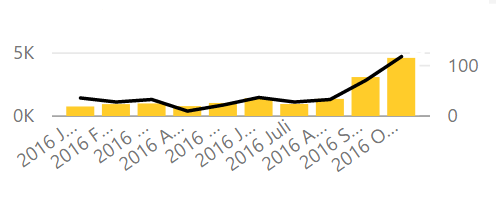
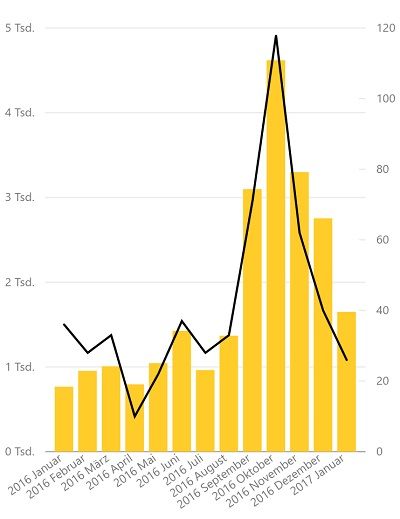
I am building a mobile report. The problem that I have is that the dates are shown in a chronologycal order from left to right. Therefore I can't see the last date (in my case, JAN 2017) in my mobile dashboard. I want to know if there is a possibility for this wide visuals to show the dates from right to left chronologically. That way in the mobile version you always see the last date and it is not cut out in the preview design (Screenshot 1).
Here are the screenshots:here is where I am design and also the dashboard modus in my mobile.
This is the normal barchart
Thansk in advance.
Jorge
Solved! Go to Solution.
Hi @Jmenas
At the moment, reports visuals don’t allow control over the direction of date order.
A good workaround for this issue might be using filters at report, page or visual level to limit the amount of data shown – you can read more about filters here.
We also recommend submitting and idea in our ideas section for the desktop team to consider.
Thanks,
Hi @Jmenas
At the moment, reports visuals don’t allow control over the direction of date order.
A good workaround for this issue might be using filters at report, page or visual level to limit the amount of data shown – you can read more about filters here.
We also recommend submitting and idea in our ideas section for the desktop team to consider.
Thanks,
Check out the November 2025 Power BI update to learn about new features.
Advance your Data & AI career with 50 days of live learning, contests, hands-on challenges, study groups & certifications and more!