Get certified for free when you join Fabric Data Days 2026 and dive into Fabric, Power BI, SQL, AI, and other essential data skills.
Join nowTry your skills in the Power BI Dataviz World Championship! Round one ends June 26. Join now
Hi Community,
Recently I found the following BUG on the mobile app.
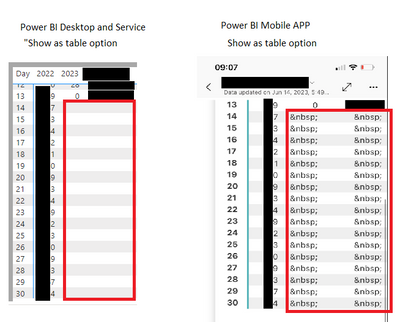
The HTML code: " " for blank/space is being displayed when the value is supposed to be "BLANK".
The error happens when I use the "show as table" on pbi mobile app.
On PBI desktop and service the values are showing as expected (not showing anything) but when the user opens the report using PBI mobile app and clicks on "show as table", instead of showing "" (nothing), the table is showing html code.
To be clear: I'm not using any HTML as any source of data. The measures are simple ifs like:
current year =
VAR cumulative =
CALCULATE(
[measure]
,KEEPFILTERS( YEAR(fact_table[date]) = YEAR(TODAY()))
)
RETURN
IF(
VALUES(Date_Dim[Day]) > [Max Current day]
, BLANK()
, cumulative
)
Thank you in advance!
Hi @mbregunci ,
Thank you for reporting this. We are able to reproduce the issue and working on a fix.
Thanks,
Michal
Hi @mbregunci ,
We are working on releasing a fix. We expect it to be available by early August.
This is a service side fix, therefore there is no need to upgrade the app in order to enjoy it.
Thanks,
Michal
Don't miss out on Data Days, June 15 through August 7. Learn Fabric, Power BI, SQL, AI and more.
Check out the May 2026 Power BI update to learn about new features.