Join us at FabCon Atlanta from March 16 - 20, 2026, for the ultimate Fabric, Power BI, AI and SQL community-led event. Save $200 with code FABCOMM.
Register now!Learn from the best! Meet the four finalists headed to the FINALS of the Power BI Dataviz World Championships! Register now
Is it possible to give an array of selectinID-s in the identities property of the object passed to the toolTipService.show?
Solved! Go to Solution.
Hi @Balogh1Bence,
This show() method just supports a single selection ID, as report page tooltips work off a single selection ID that contains the necessary measures and/or columns + values) to trigger it.
If you need multiple values for a category, for example, you can chain .withCategory() for all applicable data view indicies when generating the selection ID.
Let's say you want to generate an ID for elements 0, 10, and 32 from your category column's values array (numbers are aribtrary).
Crude pseudocode (assuming you already have the column stored as a variable) would be something like:
const builder = host.createSelectionIdBuilder();
const selectionId = builder
.withCategory(categoryColumn, 0)
.withCategory(categoryColumn, 10)
.withCategory(categoryColumn, 32)
.createSelectionId();
This can then be passed to your tooltip's show() method to ensure that all three values are selected.
You can chain the .with* methods as many times a you need (including measures and matrix/table nodes, depending on how your data view mapping is set up).
You're also able to work this approach into an iterator, so if you have an array of selected values and their indices, you would declare the builder outside the loop, so it's appropriately scoped and then you can incrementally call the .with* method in the iterator on each pass. This will append the ID onto the outer-scoped builder.
Once complete, you can call .createSelectionId() on your builder variable to get an accumulated selection ID with multiple points that you can pass to a tooltip.
Regards,
Daniel
Proud to be a Super User!
On how to ask a technical question, if you really want an answer (courtesy of SQLBI)
Hi @Balogh1Bence,
This show() method just supports a single selection ID, as report page tooltips work off a single selection ID that contains the necessary measures and/or columns + values) to trigger it.
If you need multiple values for a category, for example, you can chain .withCategory() for all applicable data view indicies when generating the selection ID.
Let's say you want to generate an ID for elements 0, 10, and 32 from your category column's values array (numbers are aribtrary).
Crude pseudocode (assuming you already have the column stored as a variable) would be something like:
const builder = host.createSelectionIdBuilder();
const selectionId = builder
.withCategory(categoryColumn, 0)
.withCategory(categoryColumn, 10)
.withCategory(categoryColumn, 32)
.createSelectionId();
This can then be passed to your tooltip's show() method to ensure that all three values are selected.
You can chain the .with* methods as many times a you need (including measures and matrix/table nodes, depending on how your data view mapping is set up).
You're also able to work this approach into an iterator, so if you have an array of selected values and their indices, you would declare the builder outside the loop, so it's appropriately scoped and then you can incrementally call the .with* method in the iterator on each pass. This will append the ID onto the outer-scoped builder.
Once complete, you can call .createSelectionId() on your builder variable to get an accumulated selection ID with multiple points that you can pass to a tooltip.
Regards,
Daniel
Proud to be a Super User!
On how to ask a technical question, if you really want an answer (courtesy of SQLBI)
thank you, it works well. Do you know if there is a way to create a selectionID for a measure? Iam using a matrix dataView
Yes - use .withMeasure() and pass the queryName property from the relevant MetadataColumn.
Proud to be a Super User!
On how to ask a technical question, if you really want an answer (courtesy of SQLBI)
The sympton is that I can see all the measures on the tooltip report
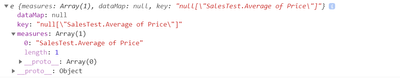
somehow it does not work. This is the selectionID created with the queryname.
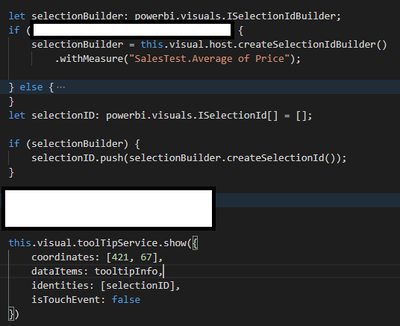
And thats how I create it:
Share feedback directly with Fabric product managers, participate in targeted research studies and influence the Fabric roadmap.
Check out the February 2026 Power BI update to learn about new features.
| User | Count |
|---|---|
| 3 | |
| 3 | |
| 2 | |
| 2 | |
| 1 |
| User | Count |
|---|---|
| 6 | |
| 5 | |
| 3 | |
| 3 | |
| 2 |