Join us in Barcelona for FabCon and SQLCon, September 28 - October 1, 2026.
This is best Fabric, Power BI, SQL and AI community event. How do we know? The last event sold out! Save €200 with code FABCMTY200.
Register now- Power BI forums
- Get Help with Power BI
- Desktop
- Service
- Report Server
- Power Query
- Mobile Apps
- Developer
- DAX Commands and Tips
- Custom Visuals Development Discussion
- Health and Life Sciences
- Power BI Spanish forums
- Translated Spanish Desktop
- Training and Consulting
- Instructor Led Training
- Dashboard in a Day for Women, by Women
- Galleries
- Data Stories Gallery
- Themes Gallery
- Contests Gallery
- QuickViz Gallery
- Quick Measures Gallery
- Visual Calculations Gallery
- Fabric Apps Gallery
- Notebook Gallery
- Translytical Task Flow Gallery
- TMDL Gallery
- R Script Showcase
- Webinars and Video Gallery
- Ideas
- Custom Visuals Ideas (read-only)
- Issues
- Issues
- Events
- Upcoming Events
The Fabric community is upgrading! Read all of the details including the timeline and what you can expect. Learn more
- Power BI forums
- Forums
- Get Help with Power BI
- Developer
- Re: power bi embedded in wordpress
- Subscribe to RSS Feed
- Mark Topic as New
- Mark Topic as Read
- Float this Topic for Current User
- Bookmark
- Subscribe
- Printer Friendly Page


- Mark as New
- Bookmark
- Subscribe
- Mute
- Subscribe to RSS Feed
- Permalink
- Report Inappropriate Content
power bi embedded in wordpress
I want to put Power BI Embedded feature in my blogging site.
I've gone through in Azure portal and setup Workspace Collection, Workspace, and Subscription ID and Workspace ID are also created. I have everything I need, but I have no idea how to put this in my Wordpress site.
I've looked up for a Wordpress plugin, but there isn't one for Power BI Embedded.
Is there a way I can put Power BI Embedded in Wordpress? I'm not a developer, so your help is much appreciated. I am thinking having a plugin for PHP inserting is an option, then just put the codes there? Not sure what I need to do.
Thank you for your help.

- Mark as New
- Bookmark
- Subscribe
- Mute
- Subscribe to RSS Feed
- Permalink
- Report Inappropriate Content


- Mark as New
- Bookmark
- Subscribe
- Mute
- Subscribe to RSS Feed
- Permalink
- Report Inappropriate Content
@paulc wrote:
I want to put Power BI Embedded feature in my blogging site.
I've gone through in Azure portal and setup Workspace Collection, Workspace, and Subscription ID and Workspace ID are also created. I have everything I need, but I have no idea how to put this in my Wordpress site.
I've looked up for a Wordpress plugin, but there isn't one for Power BI Embedded.
Is there a way I can put Power BI Embedded in Wordpress? I'm not a developer, so your help is much appreciated. I am thinking having a plugin for PHP inserting is an option, then just put the codes there? Not sure what I need to do.
Thank you for your help.
I don't think it is a good idea to use Power BI Embeded in your blogging site, as Power BI Embedded is charged by session which you can simply understand it as that once someone view the embedded report in your public site, you'll be billed.
Maybe you can try "publish to web", it is free and the embedding code is very simple.
- Mark as New
- Bookmark
- Subscribe
- Mute
- Subscribe to RSS Feed
- Permalink
- Report Inappropriate Content
Eric, thank you for your reply. Yes, I'm aware of Publish To Web feature and I'm using that one also. But, I'm hoping to figure out how to Embedded more securely. I'm not sure how to create those iFrame lines and put it into Webpress page.
- Mark as New
- Bookmark
- Subscribe
- Mute
- Subscribe to RSS Feed
- Permalink
- Report Inappropriate Content
@paulc wrote:
Eric, thank you for your reply. Yes, I'm aware of Publish To Web feature and I'm using that one also. But, I'm hoping to figure out how to Embedded more securely. I'm not sure how to create those iFrame lines and put it into Webpress page.
In you original post, as you mentioned azure workspace collection and workspace, so I did't think you're using "Publish to web". For "Publish to web", it is very easy to embed, just try to copy below to a txt file, rename to file with a html extension and open it in your browser.
<html>
<iframe width="800" height="600" src="https://msit.powerbi.com/view?r=eyJrIjoiNDJiMWQzNDgtMjhiOC00NDQxLWFjNzAtNTI0NjFiN2Q3M2M5IiwidCI6IjcyZjk4OGJmLTg2ZjEtNDFhZi05MWFiLTJkN2NkMDExZGI0NyIsImMiOjV9" frameborder="0" allowFullScreen="true"></iframe>
</html>
You'll get the <iframe ........></iframe> tag from PowerBI.COM once you set some report "publish to web".
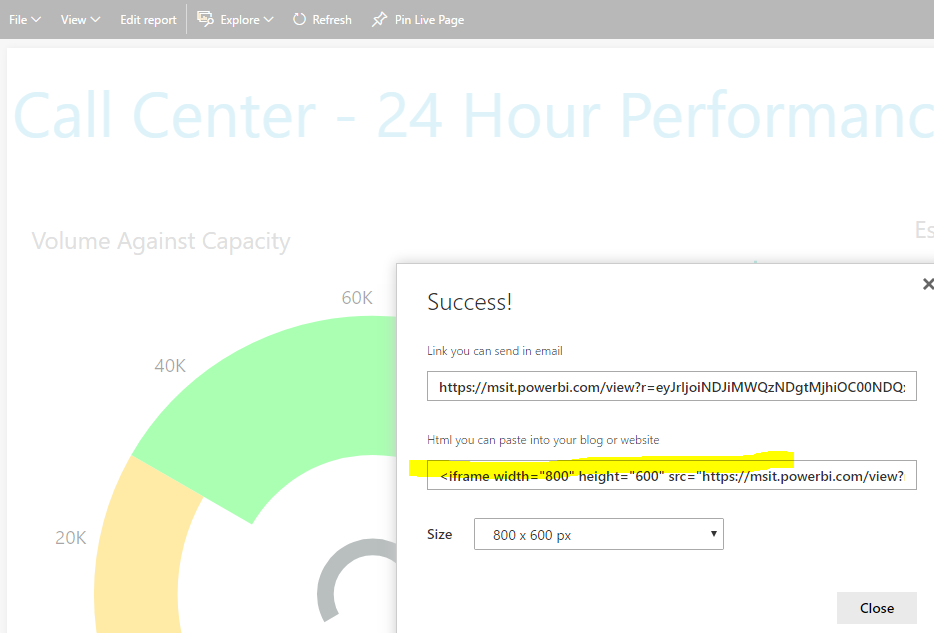
By the way, what is the security concern? As you are attempt to embed the report to a public blogging site, so I think "Publish to web" shall be good. Nobody can access and modify your reports in PowerBI.com with the url link.
- Mark as New
- Bookmark
- Subscribe
- Mute
- Subscribe to RSS Feed
- Permalink
- Report Inappropriate Content
I found below iFrame code.... but doesn't work...
<div id="pbi-report"
style="height:95vh;"
powerbi-type="report"
powerbi-embed-url="url here"
powerbi-access-token="key here">
<iframe
src="url here"
scrolling="no"
allowfullscreen="true"
style="width:100%;height:100%;">
</iframe>
</div>

Helpful resources

FabCon & SQLCon – Barcelona 2026
Join us in Barcelona for FabCon and SQLCon, the Fabric, Power BI, SQL, and AI community event. Save €200 with code FABCMTY200.

Power BI DataViz World Championships - June 2026
A new Power BI DataViz World Championship is coming this June! Don't miss out on submitting your entry.

| User | Count |
|---|---|
| 2 | |
| 1 | |
| 1 | |
| 1 | |
| 1 |


| User | Count |
|---|---|
| 4 | |
| 2 | |
| 1 | |
| 1 | |
| 1 |


