cancel
Showing results for 
Search instead for 
Did you mean: 

The Fabric community is now in read-only for platform upgrade. Learn more

Reply
antonb
Frequent Visitor

loop through sources

Hi all,


I'm new to this community so I hope that i got the location right..


background:

I want to build someting around the webAPI's of the task tool Nozbe. You can organize your tasks in projects. I want all the tasks and all the projects so I can see the progress of tasks done. basically just because i thing this should be able with Power BI and I want to improve my Power BI skills.


current situation:

api for projects fills my project tables (https://webapp.nozbe.com/api/projects/)

but then I have to call the taks below based on the project ID. (https://webapp.nozbe.com/api/actions/what-project/id-????/)

I ve used the combine function to combine multiple queries (taks for project x, y, z).. but that is too fixed (I don't want to change code when I make  a new project)


Question:

Is it posible to use a parameter to call the taks of a project and then loop through it.


so in simplified code:

For each [projectid] in Projects do:

    tablewithtasks = tablewithtasks + call: https://webapp.nozbe.com/api/actions/what-project/id-[projectid]


Thanks in advance,

Anton


1 ACCEPTED SOLUTION
Eric_Zhang
Microsoft Employee
Microsoft Employee


 It's all about getting third party data via API's


@antonb


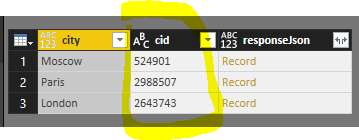
If I got your idea correctly, you could store the parameters in one column and call the API row by row. Check a simple demo below. You could check the returned json by clicking Moscow weather json.


Capture.PNG

let
    Source = Table.FromRecords({  
  
    [city= "Moscow",cid=524901],  
  
    [city= "Paris",cid=2988507],  
  
    [city= "London",cid=2643743]}),
    #"Changed Type" = Table.TransformColumnTypes(Source,{{"cid", type text}}),
    #"Added Custom" = Table.AddColumn(#"Changed Type", "responseJson", each Json.Document(Web.Contents("http://api.openweathermap.org/data/2.5/forecast/city?id="&[cid]&"&APPID=76acd9a867adb4cd9120298d16b3655f")))
in
    #"Added Custom"

View solution in original post

4 REPLIES 4
Mcburn
Helper II
Helper II

Hey antonb,


do you built your own Visual or you want take your third party data in Power BI?

sry when i missunderstand your question.


Nice Regards


Mcburn

antonb
Frequent Visitor

hi Mcburn,


It's all about getting third party data via API's


Thanks!

Anton


Eric_Zhang
Microsoft Employee
Microsoft Employee


 It's all about getting third party data via API's


@antonb


If I got your idea correctly, you could store the parameters in one column and call the API row by row. Check a simple demo below. You could check the returned json by clicking Moscow weather json.


Capture.PNG

let
    Source = Table.FromRecords({  
  
    [city= "Moscow",cid=524901],  
  
    [city= "Paris",cid=2988507],  
  
    [city= "London",cid=2643743]}),
    #"Changed Type" = Table.TransformColumnTypes(Source,{{"cid", type text}}),
    #"Added Custom" = Table.AddColumn(#"Changed Type", "responseJson", each Json.Document(Web.Contents("http://api.openweathermap.org/data/2.5/forecast/city?id="&[cid]&"&APPID=76acd9a867adb4cd9120298d16b3655f")))
in
    #"Added Custom"

thanks.. that helped a lot!


I now have a query that starts with the projects. Than within the same query a extra column is added with the JSON request (with a variable of the projectsID).  

Helpful resources

Announcements
FabCon and SQLCon Barcelona 2026

FabCon & SQLCon – Barcelona 2026

Join us in Barcelona for FabCon and SQLCon, the Fabric, Power BI, SQL, and AI community event. Save €200 with code FABCMTY200.

Power BI DataViz World Championships carousel

Power BI DataViz World Championships - June 2026

A new Power BI DataViz World Championship is coming this June! Don't miss out on submitting your entry.