

cancel
Showing results for 
Search instead for 
Did you mean: 

The Power BI Data Visualization World Championships is back! Get ahead of the game and start preparing now! Learn more

Reply
Anonymous
Not applicable

cannot get line to italic / bold?

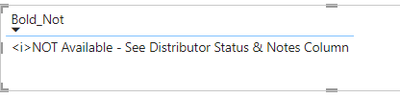
Why is this not working?
Measure: Bold_Not =
"<i>" & MIN('DOH_Prod_List'[Product Status])
 
Display: 
TGM_0-1655217076986.png


1 ACCEPTED SOLUTION

Hi @Anonymous,

If you want the word to be in bold via HTML, you need to use the bold tag (<b>) rather than the italic tag (<i>).
The tag also needs to enclose the word or phrase you wish to emphasise, so you could use a measure like the following, which uses the SUBSTITUTE function to replace the NOT with what you want, e.g.:

Bold_Not = 
    VAR _Value = MIN(DOH_Prod_List[Product Status])
    RETURN SUBSTITUTE( _Value, "NOT", "<b>NOT</b>" )

Side-by-side will now look as follows, relative to your original column:

dmp_0-1655262273625.png

And in a custom visual that renders HTML, it should look like this:

dmp_1-1655262320735.png

Regards,

Daniel


Did I answer your question? Mark my post as a solution!

Proud to be a Super User!


On how to ask a technical question, if you really want an answer (courtesy of SQLBI)


View solution in original post

2 REPLIES 2
Anonymous
Not applicable

ok i see my issue and have fixed that.. needed to use HTML box.


Now i only want the word NOT to be bold?

Hi @Anonymous,

If you want the word to be in bold via HTML, you need to use the bold tag (<b>) rather than the italic tag (<i>).
The tag also needs to enclose the word or phrase you wish to emphasise, so you could use a measure like the following, which uses the SUBSTITUTE function to replace the NOT with what you want, e.g.:

Bold_Not = 
    VAR _Value = MIN(DOH_Prod_List[Product Status])
    RETURN SUBSTITUTE( _Value, "NOT", "<b>NOT</b>" )

Side-by-side will now look as follows, relative to your original column:

dmp_0-1655262273625.png

And in a custom visual that renders HTML, it should look like this:

dmp_1-1655262320735.png

Regards,

Daniel


Did I answer your question? Mark my post as a solution!

Proud to be a Super User!


On how to ask a technical question, if you really want an answer (courtesy of SQLBI)


Helpful resources

Announcements
Power BI DataViz World Championships

Power BI Dataviz World Championships

The Power BI Data Visualization World Championships is back! Get ahead of the game and start preparing now!

December 2025 Power BI Update Carousel

Power BI Monthly Update - December 2025

Check out the December 2025 Power BI Holiday Recap!

FabCon Atlanta 2026 carousel

FabCon Atlanta 2026

Join us at FabCon Atlanta, March 16-20, for the ultimate Fabric, Power BI, AI and SQL community-led event. Save $200 with code FABCOMM.