cancel
Showing results for 
Search instead for 
Did you mean: 

The Power BI Data Visualization World Championships is back! It's time to submit your entry. Live now!

Reply
marlirendell
New Member

Word Cloud Separating Names

I'm using the word cloud extension to create a word cloud of names. Currently it's seperating first and last names (these are in the same column, not seperate columns). How do I keep the first and last names together?

1 ACCEPTED SOLUTION
Anonymous
Not applicable

Hi @marlirendell ,

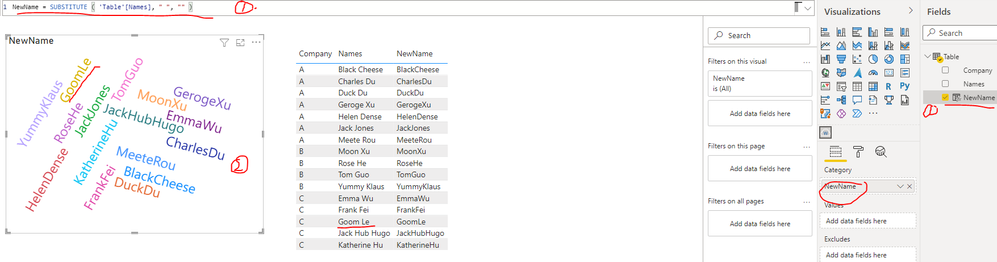
You can create a calculated column as below to remove the spaces in Name field first, then put this new calculated column onto Word Cloud visual just like below screenshot. You can find the details in the attachment.

NewName = SUBSTITUTE ( 'Table'[Names], " ", "" )

yingyinr_0-1637906646712.png

Best Regards

View solution in original post

1 REPLY 1
Anonymous
Not applicable

Hi @marlirendell ,

You can create a calculated column as below to remove the spaces in Name field first, then put this new calculated column onto Word Cloud visual just like below screenshot. You can find the details in the attachment.

NewName = SUBSTITUTE ( 'Table'[Names], " ", "" )

yingyinr_0-1637906646712.png

Best Regards

Helpful resources

Announcements
Power BI DataViz World Championships

Power BI Dataviz World Championships

The Power BI Data Visualization World Championships is back! It's time to submit your entry.

January Power BI Update Carousel

Power BI Monthly Update - January 2026

Check out the January 2026 Power BI update to learn about new features.

FabCon Atlanta 2026 carousel

FabCon Atlanta 2026

Join us at FabCon Atlanta, March 16-20, for the ultimate Fabric, Power BI, AI and SQL community-led event. Save $200 with code FABCOMM.