cancel
Showing results for 
Search instead for 
Did you mean: 

The Power BI Data Visualization World Championships is back! Get ahead of the game and start preparing now! Learn more

Reply
JohNWMCC
Regular Visitor

Web access to API not working

Hey Folks,


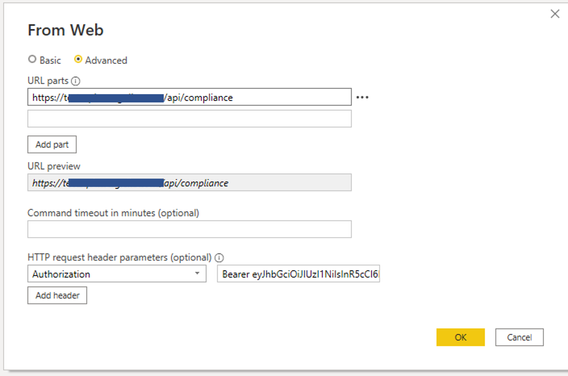
quick one. I've been connecting to an API and pulling the data into Power BI. I connect via the get data from web option and setting it up like this:

Config for connecting the APIConfig for connecting the API

It's been working fine and have managed to connect multiple tables to it until yesterday.

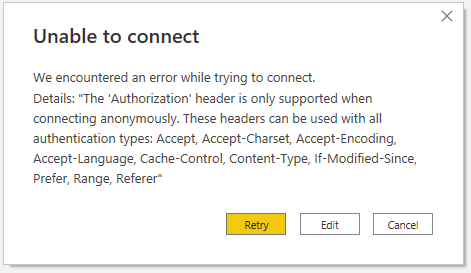
Now I get this error,

Error resultError result

I'm keen for any suggestions.


I'm running power BI desktop Version: 2.106.582.0 64-bit (June 2022)

1 ACCEPTED SOLUTION
Anonymous
Not applicable

Hi @JohNWMCC,

Did any update on your API server-side affect the current data connections?
In addition, you can also try to add the 'relativepath' option in your data connector if the authorization is worked on the root path.

Chris Webb's BI Blog: Using The RelativePath And Query Options With Web.Contents() In Power Query An...

Regards,

Xiaoxin Sheng

View solution in original post

1 REPLY 1
Anonymous
Not applicable

Hi @JohNWMCC,

Did any update on your API server-side affect the current data connections?
In addition, you can also try to add the 'relativepath' option in your data connector if the authorization is worked on the root path.

Chris Webb's BI Blog: Using The RelativePath And Query Options With Web.Contents() In Power Query An...

Regards,

Xiaoxin Sheng

Helpful resources

Announcements
Power BI DataViz World Championships

Power BI Dataviz World Championships

The Power BI Data Visualization World Championships is back! Get ahead of the game and start preparing now!

December 2025 Power BI Update Carousel

Power BI Monthly Update - December 2025

Check out the December 2025 Power BI Holiday Recap!

FabCon Atlanta 2026 carousel

FabCon Atlanta 2026

Join us at FabCon Atlanta, March 16-20, for the ultimate Fabric, Power BI, AI and SQL community-led event. Save $200 with code FABCOMM.