Hello.
I am looking to create an electronic kanban visual using Power BI. My goal is to bring in five fields of data.
These fields will be "Item Number","Maximum Inventory", "Minimum Inventory", "Safety Inventory", and "Current Inventory".
Each Item will have unique inventory levels based on the current demand of that Item, and these levels will change based on the item number and the current demand that it is currently experiencing (Live data will be pulled).
I would like to use "bars" to visualize how each "Max Inventory" level stacks up with with the other items. (This will allow a visual of the Items that are in the highest demands).
I would like each level to be displayed with a color. Maximum Inventory = Green. Minimum Inventory = Yellow. Safety Inventory = Red. The current inventory shall be displayed with a "line" that goes accross each bar.
Finally, I would like the Item number to be displayed as a color as well based on how the Current Inventory relates to the inventory demands stated above.
I have attached visuals below for reference.
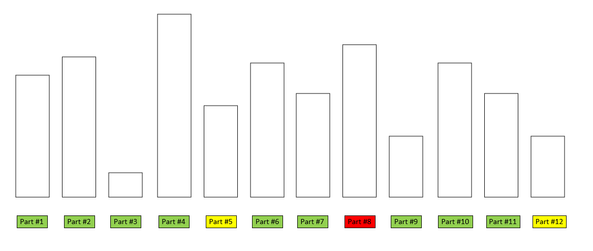
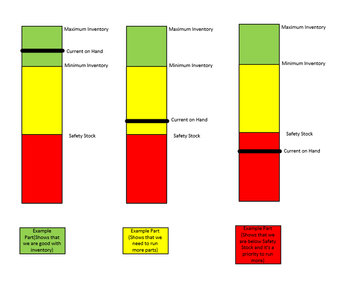
I would like this to be done in Power BI based on the number of Items that I will be needing analysis on.
If anyone has something that they have used that is similar to this, please let me know. I have experimented with the Linear Gauge that X-Viz offers, however there doesn't seem to be an easy way to enter a multitude of items into this gauge.
Thank you in advance for anyone help, I greatly appreciate it!


