Get Fabric or SQL Certified for Free.
Get certified for free when you join Fabric Data Days 2026 and dive into Fabric, Power BI, SQL, AI, and other essential data skills.
Join now- Power BI forums
- Get Help with Power BI
- Desktop
- Service
- Report Server
- Power Query
- Mobile Apps
- Developer
- DAX Commands and Tips
- Custom Visuals Development Discussion
- Health and Life Sciences
- Power BI Spanish forums
- Translated Spanish Desktop
- Training and Consulting
- Instructor Led Training
- Dashboard in a Day for Women, by Women
- Galleries
- Data Stories Gallery
- Themes Gallery
- Contests Gallery
- QuickViz Gallery
- Quick Measures Gallery
- Visual Calculations Gallery
- Notebook Gallery
- Translytical Task Flow Gallery
- TMDL Gallery
- R Script Showcase
- Webinars and Video Gallery
- Ideas
- Custom Visuals Ideas (read-only)
- Issues
- Issues
- Events
- Upcoming Events
July 7 - July 17 | Round 2 of the Power BI Dataviz World Championships. Don't miss your chance! Learn more
- Power BI forums
- Forums
- Get Help with Power BI
- Developer
- Re: Up Down Arrow for Numeric Inputs in Custom Vis...
- Subscribe to RSS Feed
- Mark Topic as New
- Mark Topic as Read
- Float this Topic for Current User
- Bookmark
- Subscribe
- Printer Friendly Page


- Mark as New
- Bookmark
- Subscribe
- Mute
- Subscribe to RSS Feed
- Permalink
- Report Inappropriate Content
Up Down Arrow for Numeric Inputs in Custom Visual
Hello there,
I want to show up down arrow for numeric field in custom visual just like we have for font-size. I am using following syntax for numeric field
"decimalPlaces": {
   "displayName": "Value Decimal Places",
    "type": {
       "numeric": true
   }
}
Which produces following results.
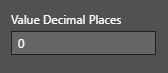
It would be better if we can show arrows for quick value changes. How do I add arrows to this field?
Solved! Go to Solution.


- Mark as New
- Bookmark
- Subscribe
- Mute
- Subscribe to RSS Feed
- Permalink
- Report Inappropriate Content
This is a full list of properties that I know about:
-
weight
-
angle
-
textSize
-
fontSize
-
titleFontSize
-
secFontSize
-
secTitleFontSize
-
outlineWeight
-
gridVerticalWeight
-
gridHorizontalWeight
-
barWeight
-
rowPadding
-
cardPadding
-
imageHeight
-
steppedLayoutIndentation
-
borderThickness
-
preferredCategoryWidth
-
strokeWidth
-
gridlineThickness
-
markerSize
Ignat Vilesov,
Software Engineer
Microsoft Power BI Custom Visuals


- Mark as New
- Bookmark
- Subscribe
- Mute
- Subscribe to RSS Feed
- Permalink
- Report Inappropriate Content
You may try type enumeration.
If this post helps, then please consider Accept it as the solution to help the other members find it more quickly.
- Mark as New
- Bookmark
- Subscribe
- Mute
- Subscribe to RSS Feed
- Permalink
- Report Inappropriate Content
Power BI has a few hard coded property names that will force PBI to show arrows.
What value range are you instrested in? If there's no specific value range we would recommend to keep it as it.
PBI users actually can use Keyboard Arrows to increase/decrease values.
Ignat Vilesov,
Software Engineer
Microsoft Power BI Custom Visuals
- Mark as New
- Bookmark
- Subscribe
- Mute
- Subscribe to RSS Feed
- Permalink
- Report Inappropriate Content
It is really convenient to click on arrows to adjust the number. Default Power BI visual shows arrows for numeric inputs so I thought end user would expect similar thing in custom visual.
Also how do I set range for numeric input? Is there a way to do it in capabilities.json file or do I have to manage it in the code?
- Mark as New
- Bookmark
- Subscribe
- Mute
- Subscribe to RSS Feed
- Permalink
- Report Inappropriate Content
What default vsiuals are you talking about?
Ignat Vilesov,
Software Engineer
Microsoft Power BI Custom Visuals
- Mark as New
- Bookmark
- Subscribe
- Mute
- Subscribe to RSS Feed
- Permalink
- Report Inappropriate Content
- Mark as New
- Bookmark
- Subscribe
- Mute
- Subscribe to RSS Feed
- Permalink
- Report Inappropriate Content
As mentioned above, Power BI uses special types and hard coded name for such case.
If you wanted to show box with arrow to stroke width you should call your property as: strokeWidth
Ignat Vilesov,
Software Engineer
Microsoft Power BI Custom Visuals
- Mark as New
- Bookmark
- Subscribe
- Mute
- Subscribe to RSS Feed
- Permalink
- Report Inappropriate Content
@v-viig Now I understand that I have to used predefined properties name in order to get that arrows and there is no other way as of now. Can you please provide if possible the list of all predefined proerties such as strokeWidth which I can use to get desired settings?
- Mark as New
- Bookmark
- Subscribe
- Mute
- Subscribe to RSS Feed
- Permalink
- Report Inappropriate Content
This is a full list of properties that I know about:
-
weight
-
angle
-
textSize
-
fontSize
-
titleFontSize
-
secFontSize
-
secTitleFontSize
-
outlineWeight
-
gridVerticalWeight
-
gridHorizontalWeight
-
barWeight
-
rowPadding
-
cardPadding
-
imageHeight
-
steppedLayoutIndentation
-
borderThickness
-
preferredCategoryWidth
-
strokeWidth
-
gridlineThickness
-
markerSize
Ignat Vilesov,
Software Engineer
Microsoft Power BI Custom Visuals
- Mark as New
- Bookmark
- Subscribe
- Mute
- Subscribe to RSS Feed
- Permalink
- Report Inappropriate Content
Thank you Ignat for the list.

Helpful resources

FabCon & SQLCon – Barcelona 2026
Join us in Barcelona for FabCon and SQLCon, the Fabric, Power BI, SQL, and AI community event. Save €200 with code FABCMTY200.

Data Days 2026
Join Fabric Data Days 2026: 60 days of free live/on-demand sessions, challenges, study groups, and certification opportunities.

Power BI DataViz World Championships - June 2026
A new Power BI DataViz World Championship is coming this June! Don't miss out on submitting your entry.


