cancel
Showing results for 
Search instead for 
Did you mean: 

Try your skills in the Power BI Dataviz World Championship! Round one ends June 26. Join now

Reply
Anonymous
Not applicable

The same Measure but distinct dates

Hello.

I have a table like this


CódigoF.INI_PARTIDAF.FIN_PARTIDA
 SIN FECHA10
 SIN FECHA12
 102019
 112
 12019
 92019
 102019
 SIN FECHASIN FECHA
 SIN FECHA6
41633211
 SIN FECHASIN FECHA
41311111
 112
 SIN FECHASIN FECHA
41832516
41807416
41590216
 12019
 SIN FECHASIN FECHA
 210
 SIN FECHASIN FECHA
 SIN FECHASIN FECHA
 12019
 SIN FECHASIN FECHA
 SIN FECHASIN FECHA
419426112

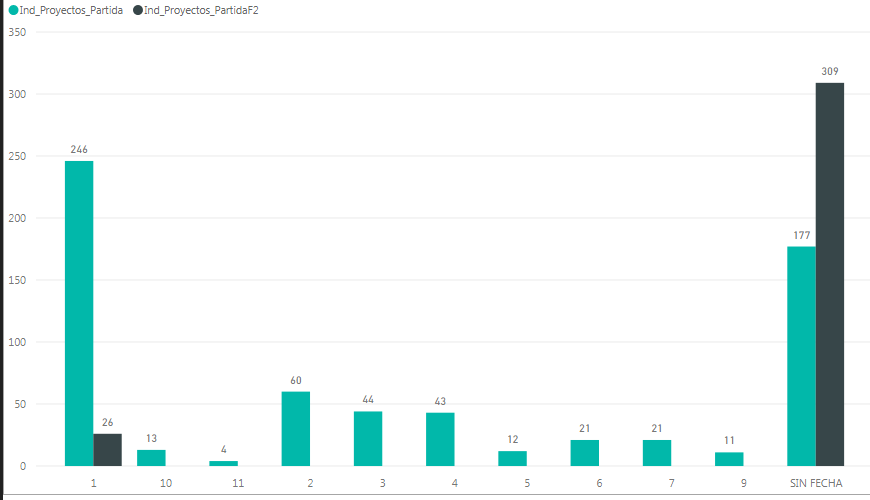
I would like to build two measures. The first one, a measrure that would obtain the number of Codigo_Clarity by F.INI_PARTIDA and the other one by F.Fin_Partida and put them in the same graph such in the attached image

With this dataset for the Month 1 the first Measures would be 11 and the second Measure would be 2.

For the Month 2 the first Measure would be 1 and second one would be 0.

Thank you in advance.

2me.PNG

1 ACCEPTED SOLUTION
CadgiRo
Frequent Visitor

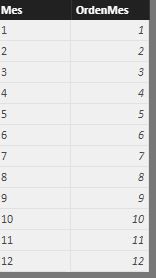
With a isolated table for months, yo can do something like this:


isolated.JPG


VALOR_A_BUSCAR =

IF (

             HASONEVALUE( Meses[Mes] );

             VALUES( Meses[Mes] );

             "ERROR"

)


Columna1 =

CALCULATE(

      COUNTROWS( Facts );

      FILTER(

             Facts;

             Facts[F.INI_PARTIDA]=[VALOR_A_BUSCAR]

      )

)


Columna2 =

CALCULATE(

      COUNTROWS( Facts );

      FILTER(

             Facts;

             Facts[F.FIN_PARTIDA]=[VALOR_A_BUSCAR]

      )

)


tell me if it's useful

View solution in original post

2 REPLIES 2
CadgiRo
Frequent Visitor

With a isolated table for months, yo can do something like this:


isolated.JPG


VALOR_A_BUSCAR =

IF (

             HASONEVALUE( Meses[Mes] );

             VALUES( Meses[Mes] );

             "ERROR"

)


Columna1 =

CALCULATE(

      COUNTROWS( Facts );

      FILTER(

             Facts;

             Facts[F.INI_PARTIDA]=[VALOR_A_BUSCAR]

      )

)


Columna2 =

CALCULATE(

      COUNTROWS( Facts );

      FILTER(

             Facts;

             Facts[F.FIN_PARTIDA]=[VALOR_A_BUSCAR]

      )

)


tell me if it's useful

Anonymous
Not applicable

Perfect.

Thank you very much.

Helpful resources

Announcements
Fabric Data Days is here Carousel

Data Days 2026

Don't miss out on Data Days, June 15 through August 7. Learn Fabric, Power BI, SQL, AI and more.

Power BI DataViz World Championships carousel

Power BI DataViz World Championships - June 2026

A new Power BI DataViz World Championship is coming this June! Don't miss out on submitting your entry.