Don't miss your chance to take the Fabric Data Engineer (DP-600) exam for FREE! Find out how by watching the DP-600 session on-demand now through April 28th.
Learn moreJoin the FabCon + SQLCon recap series. Up next: Power BI, Real-Time Intelligence, IQ and AI, and Data Factory take center stage. All sessions are available on-demand after the live show. Register now
Hello Guys,
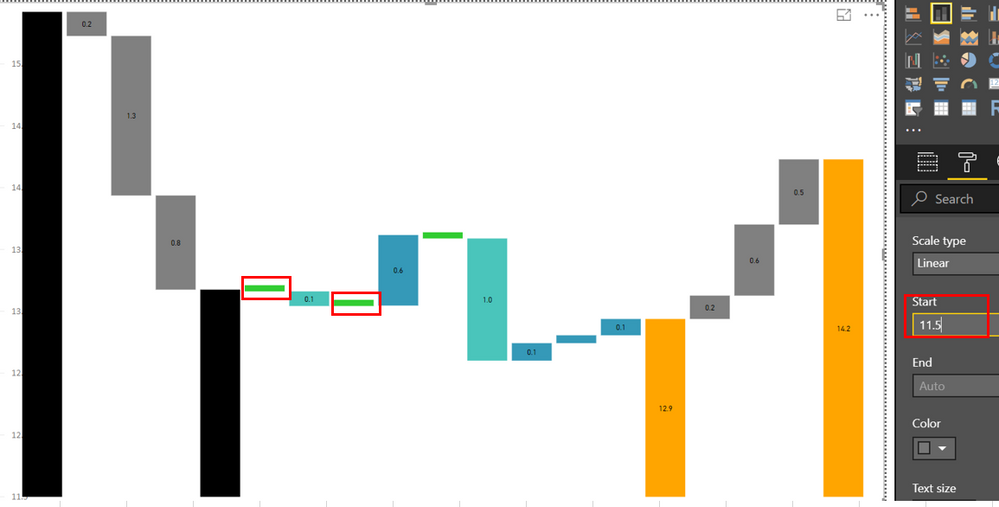
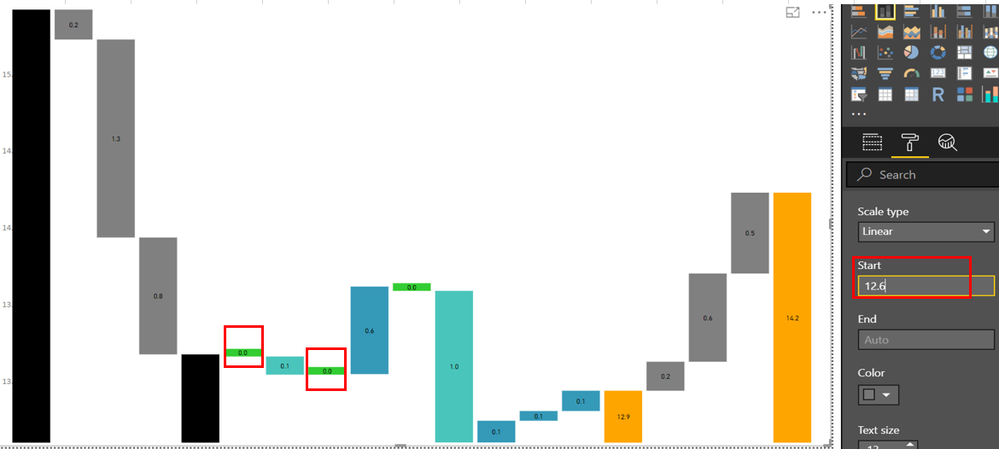
I have a requirement to show in the stacked column chart value of 0.0 when the value in the chart is zero.
One way to do it is to make the chart bigger and adjust the value in the start. However, every month I have a different set of data. So my problem is how to set the start in the Y-axis dynamically. Or any DAX to solve the issue?
At Start 11.5 value of zero in the chart is not showing.
At Start 12.6 value of zero (0.0) in the chart is showing.
Is there a way to set the start dynamically based on the data I passed in the chart since every month data varies.
Any other solution to show the zero? Any other object to use other than stacked column chart to satisfy the requirements.
Thank you in advance for your help. 🙂
Regards,
Phil
Hi Phil,
Do you use standard Stacked Column Chart?
If so, I suppose it is better to solve your question with DAX because standard visuals are updated rarely.
To get assistance with DAX you can write into Desktop thread.
Kind Regards,
Evgenii Elkin,
Software Engineer
Microsoft Power BI Custom Visuals
pbicvsupport@microsoft.com
Check out the April 2026 Power BI update to learn about new features.
If you have recently started exploring Fabric, we'd love to hear how it's going. Your feedback can help with product improvements.
A new Power BI DataViz World Championship is coming this June! Don't miss out on submitting your entry.
| User | Count |
|---|---|
| 2 | |
| 2 | |
| 1 | |
| 1 | |
| 1 |