cancel
Showing results for 
Search instead for 
Did you mean: 

The Power BI Data Visualization World Championships is back! Get ahead of the game and start preparing now! Learn more

Reply
apurvashrestha2
Microsoft Employee
Microsoft Employee

Slicers not showing all data

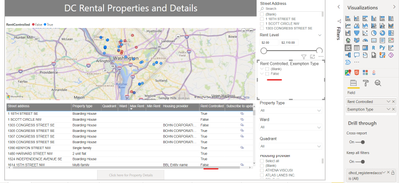
I have two columns in my slicers. If I add just one column, the data is shown correctly (blank, false & true). If I add another column in the slicer, true option vanishes although the records with true value exists in the power BI. Please find the image below for reference.

Screenshot 2021-12-29 092535.png

1 ACCEPTED SOLUTION
Anonymous
Not applicable

Hi @apurvashrestha2 ,


I see you have blank in your slicer. Is your problem that True part will disappear from your hierachy level slicer?

I think there is no down level data in True in your data model. In my sample I can reproduce the same problem like yours. True part will disappear when I expand it.

1.png

Try to enable "Show items with no data“ in value field.

1.png


Best Regards,
Rico Zhou


If this post helps, then please consider Accept it as the solution to help the other members find it more quickly.


View solution in original post

2 REPLIES 2
Anonymous
Not applicable

Hi @apurvashrestha2 ,


I see you have blank in your slicer. Is your problem that True part will disappear from your hierachy level slicer?

I think there is no down level data in True in your data model. In my sample I can reproduce the same problem like yours. True part will disappear when I expand it.

1.png

Try to enable "Show items with no data“ in value field.

1.png


Best Regards,
Rico Zhou


If this post helps, then please consider Accept it as the solution to help the other members find it more quickly.


dm-p
Super User
Super User

Hi @apurvashrestha2,

If you add multiple fields to a slicer, it becomes a hierarchy. If you want to manage the display of unique values of both columns, it's probably better to add them as two separate slicers.

If you need the hierarchy for these fields, do they relate correctly through your model and is the filter direction correct for any relationships?

Regards,

Daniel


Did I answer your question? Mark my post as a solution!

Proud to be a Super User!


On how to ask a technical question, if you really want an answer (courtesy of SQLBI)


Helpful resources

Announcements
Power BI DataViz World Championships

Power BI Dataviz World Championships

The Power BI Data Visualization World Championships is back! Get ahead of the game and start preparing now!

December 2025 Power BI Update Carousel

Power BI Monthly Update - December 2025

Check out the December 2025 Power BI Holiday Recap!

FabCon Atlanta 2026 carousel

FabCon Atlanta 2026

Join us at FabCon Atlanta, March 16-20, for the ultimate Fabric, Power BI, AI and SQL community-led event. Save $200 with code FABCOMM.