Join us at FabCon Atlanta from March 16 - 20, 2026, for the ultimate Fabric, Power BI, AI and SQL community-led event. Save $200 with code FABCOMM.
Register now!The Power BI Data Visualization World Championships is back! It's time to submit your entry. Live now!
Hi everyone,
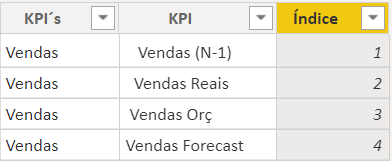
I have two tables in my model, one table (Table1) I have all data what I need and another table (Table2) I created for select all measures in one sheet:
For example:
Vendas Reais =
VAR Logic Test =
COUNTROWS(DISTINCT(FILTER(ALLSELECTED('KPI´s'[KPI]),'KPI´s'[KPI] = " Vendas Reais"))) = 1
RETURN
IF(LogicTest, [Real_Sale],blank())
The measure [Real_sale] is calculated in Table1.
I additional my report a shape (Oval) but we want this color shape change according to the selection of my measures. It´s a possible?
Thank you.
Solved! Go to Solution.
It should be explained that the fill color of Oval cannot be changed dynamically.
There is a workaround for your reference:
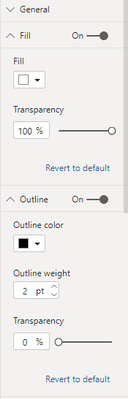
Set the fill color to white and set it to transparent.
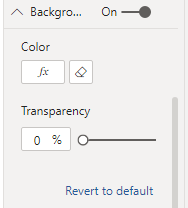
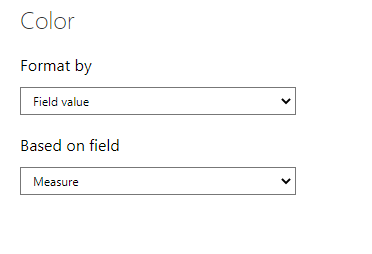
Then in the background color, we add the measure and change the color dynamically.
It should be explained that the fill color of Oval cannot be changed dynamically.
There is a workaround for your reference:
Set the fill color to white and set it to transparent.
Then in the background color, we add the measure and change the color dynamically.
Hi @V-lianl-msft , thank you.
Your suggestion helped me a lot, but I have one more question.
If for example we select two measures in filter, I have to have two sharpes right? It´s possible build a workaorund for these case?
Thank you.
This is the way to solve the problem by creating a measure and using it as the conditional formatting of the color.
I'm not sure about your scenario and the expected results. Could you share a sample pbix and shown your expected results with pictures?
The Power BI Data Visualization World Championships is back! It's time to submit your entry.
Check out the January 2026 Power BI update to learn about new features.
| User | Count |
|---|---|
| 4 | |
| 3 | |
| 2 | |
| 1 | |
| 1 |