Get Fabric or SQL Certified for Free.
Get certified for free when you join Fabric Data Days 2026 and dive into Fabric, Power BI, SQL, AI, and other essential data skills.
Join now- Power BI forums
- Get Help with Power BI
- Desktop
- Service
- Report Server
- Power Query
- Mobile Apps
- Developer
- DAX Commands and Tips
- Custom Visuals Development Discussion
- Health and Life Sciences
- Power BI Spanish forums
- Translated Spanish Desktop
- Training and Consulting
- Instructor Led Training
- Dashboard in a Day for Women, by Women
- Galleries
- Data Stories Gallery
- Themes Gallery
- Contests Gallery
- QuickViz Gallery
- Quick Measures Gallery
- Visual Calculations Gallery
- Fabric Apps Gallery
- Notebook Gallery
- Translytical Task Flow Gallery
- TMDL Gallery
- R Script Showcase
- Webinars and Video Gallery
- Ideas
- Custom Visuals Ideas (read-only)
- Issues
- Issues
- Events
- Upcoming Events
July 7 - July 17 | Round 2 of the Power BI Dataviz World Championships. Don't miss your chance! Learn more
- Power BI forums
- Forums
- Get Help with Power BI
- Developer
- Re: Select Multiple Drop Down Navigation Table Men...
- Subscribe to RSS Feed
- Mark Topic as New
- Mark Topic as Read
- Float this Topic for Current User
- Bookmark
- Subscribe
- Printer Friendly Page

- Mark as New
- Bookmark
- Subscribe
- Mute
- Subscribe to RSS Feed
- Permalink
- Report Inappropriate Content
Select Multiple Drop Down Navigation Table Menu (for custom data connector)
I am building my navigation table for my custom data connector and am looking to have a multi-select option in the menu as seen in one of the examples here: https://github.com/microsoft/DataConnectors/tree/master/samples/OpenApiSample
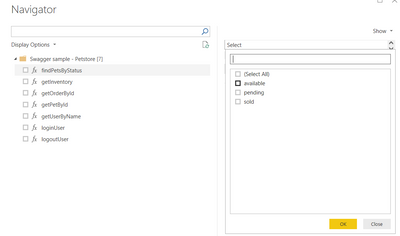
The closest I have been able to get is a single selectable drop down list, and as far as I can find there is nothing in the documentation on how to do this as there are many functions for custom data connectors which are not documented...
Solved! Go to Solution.
- Mark as New
- Bookmark
- Subscribe
- Mute
- Subscribe to RSS Feed
- Permalink
- Report Inappropriate Content
I have actually, after many many hours of trial and error, figured out how to do this.
It turned out, as most things do, to be annoyingly simple...
When you are adding the meta-data to the function for the navigation table, instead of having it as type text, simply put it as type list instead, and set the allowed values to be whatever you want to appear in the list box.
Hope this helps people!
- Mark as New
- Bookmark
- Subscribe
- Mute
- Subscribe to RSS Feed
- Permalink
- Report Inappropriate Content
I would also be interested in how to do this if anyone has any helpful tips.
Thanks,
- Mark as New
- Bookmark
- Subscribe
- Mute
- Subscribe to RSS Feed
- Permalink
- Report Inappropriate Content
I have actually, after many many hours of trial and error, figured out how to do this.
It turned out, as most things do, to be annoyingly simple...
When you are adding the meta-data to the function for the navigation table, instead of having it as type text, simply put it as type list instead, and set the allowed values to be whatever you want to appear in the list box.
Hope this helps people!

- Mark as New
- Bookmark
- Subscribe
- Mute
- Subscribe to RSS Feed
- Permalink
- Report Inappropriate Content
Hi @Anonymous I am struggling for few days now to understand how to add user input parameters for a navigation table. Could you please help to elaborate how you managed to achieve this fucntinality. Any code reference would be greately helpful. Thanks!
- Mark as New
- Bookmark
- Subscribe
- Mute
- Subscribe to RSS Feed
- Permalink
- Report Inappropriate Content
Hi @ppraveenk , you can build a navigation table like this, and then expose your functions:
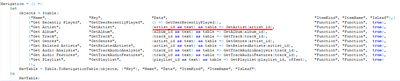
Hope it helps.
- Mark as New
- Bookmark
- Subscribe
- Mute
- Subscribe to RSS Feed
- Permalink
- Report Inappropriate Content
Hi @Anonymous
Many thanks for you reply. I want to capture the Start and End Date parameters from User before invoking the RestAPI call.
After implementing your suggestion, I am not seeing any input fields in the navigator, but getting a message "No parameter values specified".
Sorry for being ignorant, but I am trying my hands on power bi connector for the very first time.
This is how I am trying. Request you to let me know if I am doing something incorrectly. Thanks in advance!
let
source = #table({"Name", "Data", "ItemKind", "ItemName", "IsLeaf"}, {
{ "UserSearch", (startDate as text, endDate as text) as table => GetUserSearchTable(startDate, endDate), "Table", "Table", true }
{ "Users", GetUsersTable(), "Table", "Table", true }
}),
navTable = Table.ToNavigationTable(source, {"Name"}, "Name", "Data", "ItemKind", "ItemName", "IsLeaf")
in
navTable;
// Not sure if these parameters are required
//startDate = DateTime.ToText(DateTime.From(Date.AddDays(Date.From(DateTime.LocalNow()),-30)),"yyyy-MM-dd") meta [IsParameterQuery=true, Type="Text", IsParameterQueryRequired=true];
//endDate = DateTime.ToText(DateTime.From(Date.AddDays(Date.From(DateTime.LocalNow()),-1)),"yyyy-MM-dd") meta [IsParameterQuery=true, Type="Text", IsParameterQueryRequired=true];
GetUserSearchTable = (startDate as text, endDate as text) as table =>
let
body = "{ ""endDate"" : """&endDate&""" , ""startDate"" : """&startDate&"""}",
source = Web.Contents("https://rest.api/users", [ RelativePath = "search", Content = Text.ToBinary(body)]),
json = Json.Document(source),
#"Converted to Table" = Record.ToTable(json),
Value = #"Converted to Table"{0}[Value],
#"Converted to Table1" = Table.FromList(Value, Splitter.SplitByNothing(), null, null, ExtraValues.Error),
#"Expanded Column1" = Table.ExpandRecordColumn(#"Converted to Table1", "Column1", {"userID"}, {"userID"}),
#"Renamed Columns" = Table.RenameColumns(#"Expanded Column1",{{"userID", "Id"}}),
#"Invoked Custom Function" = Table.AddColumn(#"Renamed Columns", "GetListTable", each GetListTable([Id])),
#"Expanded Users" = Table.ExpandTableColumn(#"Invoked Custom Function", "GetListTable", {"name", "type"}, {"name", "type"})
in
#"Expanded Users";

- Mark as New
- Bookmark
- Subscribe
- Mute
- Subscribe to RSS Feed
- Permalink
- Report Inappropriate Content
The thing that catches my eye is the "as table" that you have on your function. If it receives parameters, you have to define it as a function, I think.
So remove it from your NavTable and GetUserSearchTable. Also, define your GetUserSearch table as "function" on the navTable.
- Mark as New
- Bookmark
- Subscribe
- Mute
- Subscribe to RSS Feed
- Permalink
- Report Inappropriate Content
Hi @Anonymous, thanks for your response.
Could you please let me know if you are aware of how to pass default value as today' date for Start and End date params in Navigation table. Highly appreciate!
- Mark as New
- Bookmark
- Subscribe
- Mute
- Subscribe to RSS Feed
- Permalink
- Report Inappropriate Content
Hi all, I haven't worked on this in a while so can't give much more insight than in my above post. To see the code where I used it (or a since updated version) have a look at the intelligent plant industrial app store data connector, that is what I was used this functionality for.
Thanks
- Mark as New
- Bookmark
- Subscribe
- Mute
- Subscribe to RSS Feed
- Permalink
- Report Inappropriate Content
Hey @Anonymous, can you explain a bit more of how you did it?
I'm currently struggling to add a dropdown to my function parameters in the navigator.
I can replicate it in Advanced Editor and works fine, but not in the connector...
Best Regards,
Carlos
Helpful resources

FabCon & SQLCon – Barcelona 2026
Join us in Barcelona for FabCon and SQLCon, the Fabric, Power BI, SQL, and AI community event. Save €200 with code FABCMTY200.

Power BI Monthly Update - July 2026
Check out the July 2026 Power BI update to learn about new features.

Data Days 2026
Join Data Days 2026: 60 days of free live/on-demand sessions, challenges, study groups, and certification opportunities.

Power BI DataViz World Championships - June 2026
A new Power BI DataViz World Championship is coming this June! Don't miss out on submitting your entry.

| User | Count |
|---|---|
| 2 | |
| 2 | |
| 1 | |
| 1 | |
| 1 |


