Join us at FabCon Atlanta from March 16 - 20, 2026, for the ultimate Fabric, Power BI, AI and SQL community-led event. Save $200 with code FABCOMM.
Register now!Learn from the best! Meet the four finalists headed to the FINALS of the Power BI Dataviz World Championships! Register now
Hi,
(I posted this to the Desktop forum yesterday, where v-xjiin-msft confirmed they were able to reproduce the issue, and suggested that I contact pbicvsupport@microsoft.com, but I thought posting it here would be better)
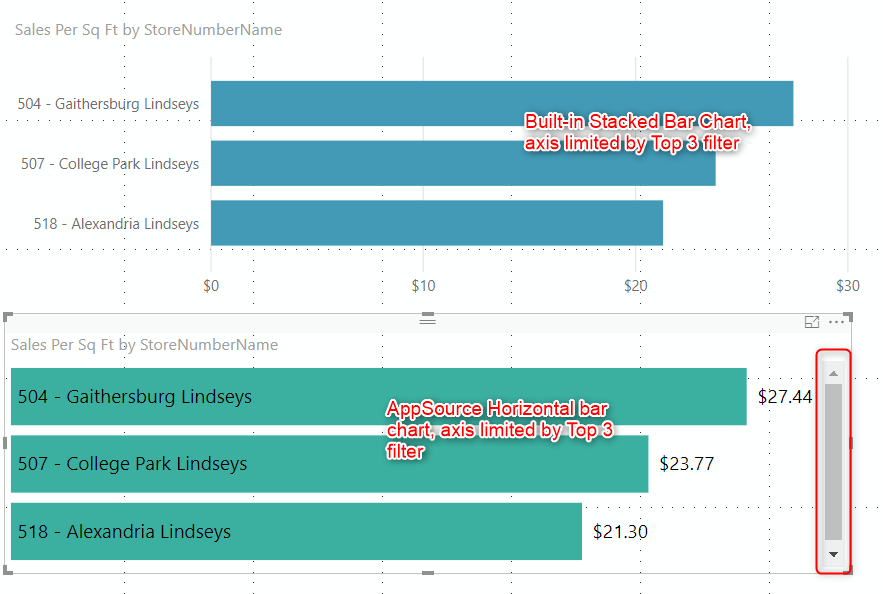
In using the the Horizontal bar chart Power BI Visual from AppSource (https://appsource.microsoft.com/en-us/product/power-bi-visuals/WA104381230?tab=Overview), I'm unable to render a chart without getting scrollbars added, regardless of how many bars I limit the visual to, or how much I resize the area the component. Is there a setting I can use (that I can't seem to locate) or is this a "feature" of the visual?
Thanks!
Unwanted Scrollbar appears
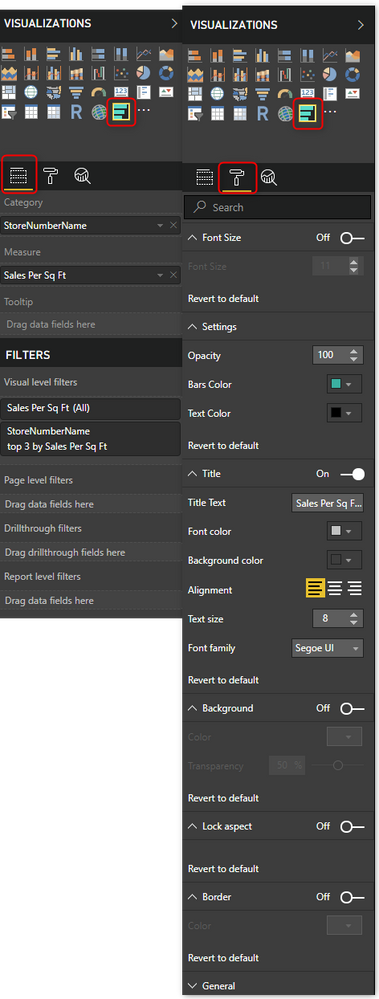
Visual Settings for Horizontal Bar Chart
Share feedback directly with Fabric product managers, participate in targeted research studies and influence the Fabric roadmap.
Check out the February 2026 Power BI update to learn about new features.
| User | Count |
|---|---|
| 3 | |
| 3 | |
| 2 | |
| 2 | |
| 1 |
| User | Count |
|---|---|
| 5 | |
| 4 | |
| 3 | |
| 3 | |
| 2 |