cancel
Showing results for 
Search instead for 
Did you mean: 

The Power BI Data Visualization World Championships is back! Get ahead of the game and start preparing now! Learn more

Reply

Scheduling / Process flow bar chart visual

Hello all! 

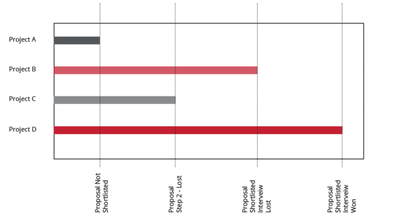
I've gotten a request to create sort of a progress visual on what stage of the pursuit process a current project is in.  (Look bellow )

yazenbarakat123_0-1661866365294.png


I started of by creating a custom column with the dax 
(

Custom Condition =
IF([Measure] = "Proposal"    && 'RO 2020 Pursuits (Marketing)'[Outcome] ="L"  && 'RO 2020 Pursuits (Marketing)'[InterviewStep] = "Y"   , "Proposal not shortlisted" ,
IF([Measure] = "Interview"    && 'RO 2020 Pursuits (Marketing)'[Outcome] ="L"  && 'RO 2020 Pursuits (Marketing)'[InterviewStep] = "Y"   , "Proposal Shortlisted , Interview Lost " , BLANK()))) 

what im having trouble doing is displaying the stage name on the X axis and Project name on the Y axis nad have the bar in the visual stop on the current stage it is in.


Thank you in advance


1 ACCEPTED SOLUTION
Anonymous
Not applicable

Hi @yazenbarakat123 ,

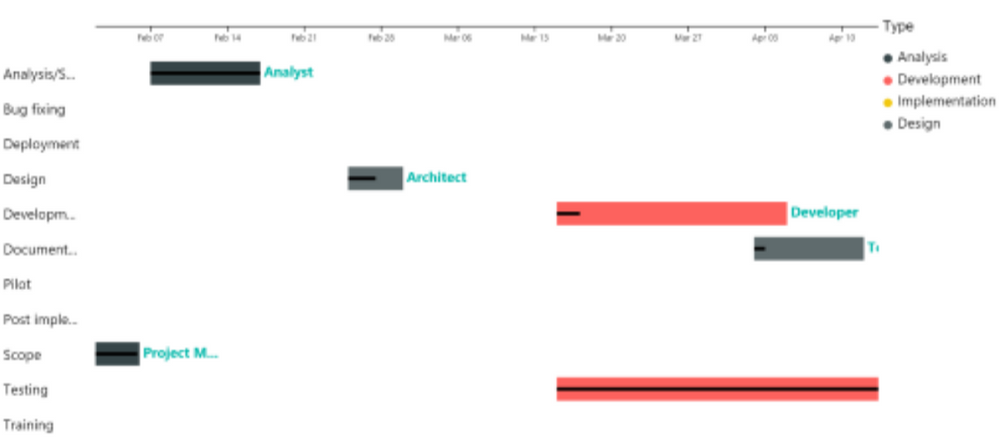
If you want to create a bar chart, the data type of the field which will be put on Y axis of bar chart must be numberic. And if the stage name can't be displayed on the visual? Please check if the custom visual Gannt is what you are looking for ....

yingyinr_0-1662094751212.png

If the above one can't help you get the desired result, please provide some sample data in the table 'RO 2020 Pursuits (Marketing)' (exclude sensitive data) with Text format and your expected result with backend logic and special examples. It is better if you can share a simplified pbix file. You can refer the following link to upload the file to the community. Thank you.

How to upload PBI in Community

Best Regards

View solution in original post

1 REPLY 1
Anonymous
Not applicable

Hi @yazenbarakat123 ,

If you want to create a bar chart, the data type of the field which will be put on Y axis of bar chart must be numberic. And if the stage name can't be displayed on the visual? Please check if the custom visual Gannt is what you are looking for ....

yingyinr_0-1662094751212.png

If the above one can't help you get the desired result, please provide some sample data in the table 'RO 2020 Pursuits (Marketing)' (exclude sensitive data) with Text format and your expected result with backend logic and special examples. It is better if you can share a simplified pbix file. You can refer the following link to upload the file to the community. Thank you.

How to upload PBI in Community

Best Regards

Helpful resources

Announcements
Power BI DataViz World Championships

Power BI Dataviz World Championships

The Power BI Data Visualization World Championships is back! Get ahead of the game and start preparing now!

December 2025 Power BI Update Carousel

Power BI Monthly Update - December 2025

Check out the December 2025 Power BI Holiday Recap!

FabCon Atlanta 2026 carousel

FabCon Atlanta 2026

Join us at FabCon Atlanta, March 16-20, for the ultimate Fabric, Power BI, AI and SQL community-led event. Save $200 with code FABCOMM.