
Join us at FabCon Atlanta from March 16 - 20, 2026, for the ultimate Fabric, Power BI, AI and SQL community-led event. Save $200 with code FABCOMM.
Register now!The Power BI Data Visualization World Championships is back! Get ahead of the game and start preparing now! Learn more
Hello,
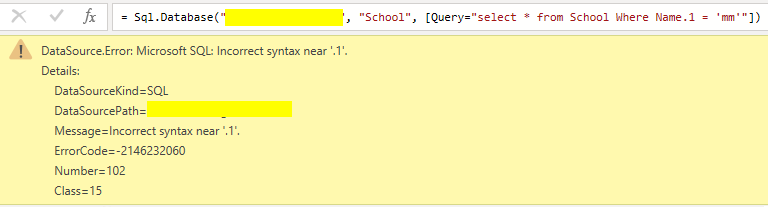
How to select table column when column name contains dot . I tried to use 'name.1' but still getting error. How to resolve it?
Solved! Go to Solution.
Hi @Analitika
I could reproduce the issue like yours. My column name in SQL is [Name.1], Power BI seems that couldn't identify the column name with dot.
I think you could try to rename the column name in SQL. If you replace "." by "_",it works well.
Best Regards,
Rico Zhou
If this post helps, then please consider Accept it as the solution to help the other members find it more quickly.
@Analitika
You can use within square brackets without quotes as follows
Tablename[ name.1]
⭕ Subscribe and learn Power BI from these videos
⚪ Website ⚪ LinkedIn ⚪ PBI User Group
Still not helped, I am getting similar error like: DataSource.Error: ODBC: ERROR [42601] ERROR: syntax error at or near "["; when I have tried to use a bracket - [name.1] for example.
Hi @Analitika
I could reproduce the issue like yours. My column name in SQL is [Name.1], Power BI seems that couldn't identify the column name with dot.
I think you could try to rename the column name in SQL. If you replace "." by "_",it works well.
Best Regards,
Rico Zhou
If this post helps, then please consider Accept it as the solution to help the other members find it more quickly.
The Power BI Data Visualization World Championships is back! Get ahead of the game and start preparing now!
| User | Count |
|---|---|
| 3 | |
| 2 | |
| 1 | |
| 1 | |
| 1 |
| User | Count |
|---|---|
| 11 | |
| 7 | |
| 4 | |
| 3 | |
| 3 |