Don't miss your chance to take the Fabric Data Engineer (DP-600) exam for FREE! Find out how by attending the DP-600 session on April 23rd (pacific time), live or on-demand.
Learn moreNext up in the FabCon + SQLCon recap series: The roadmap for Microsoft SQL and Maximizing Developer experiences in Fabric. All sessions are available on-demand after the live show. Register now
Hello everyone!
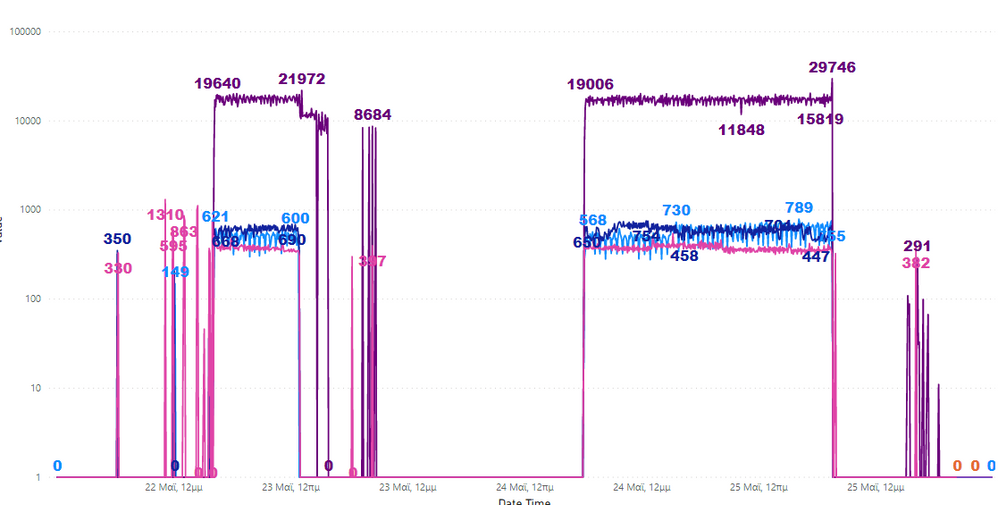
To be honest I am not sure what I am asking is even possible in Power BI but I thought I would ask. So I have the graph shown below with some avg runtime data. But you can see that before and after the two main runs (which hopefully you can identify) there are some random spikes that in order to get some valid min/max information, they would have to be removed.
What I thought is, creating some sort of script in Python that removes those spikes or replaces them with 0s but I don't know if thats possible inside Power BI. At the moment, it would be really hard to manipulate the data externally so if you have any ideas, it would be much appreciated. Thank you!
Solved! Go to Solution.
@Anonymous - Perhaps TRIMMEAN? https://community.powerbi.com/t5/Quick-Measures-Gallery/TRIMMEAN/m-p/1074075#M504
Hello @Greg_Deckler and thank you for your answer!
It seems like a really good answer but I am not quite sure of what data it gets. Is there any modification that I can put in that piece of code to show me a graph (like the one I showed) and how it has been trimmed down? I hope I made sense. I am really new to DAX.
@Anonymous - Well, to use that measure, you would replace the highlighted portion with your column name and you would need to replace the 'Table' reference with your table name. You would replace the .2 with the percentage of values that you want to trim off (top/bottom %)
TRIMMEAN =
VAR __Table =
ADDCOLUMNS(
'Table',
"Rank",RANKX('Table',[Value])
)
VAR __Percent = .2
After that, you would use this measure instead of what you are currently using in your visual.
If you have recently started exploring Fabric, we'd love to hear how it's going. Your feedback can help with product improvements.
A new Power BI DataViz World Championship is coming this June! Don't miss out on submitting your entry.
Experience the highlights from FabCon & SQLCon, available live and on-demand starting April 14th.
| User | Count |
|---|---|
| 2 | |
| 1 | |
| 1 | |
| 1 | |
| 1 |