Don't miss your chance to take the Fabric Data Engineer (DP-600) exam for FREE! Find out how by attending the DP-600 session on April 23rd (pacific time), live or on-demand.
Learn moreNext up in the FabCon + SQLCon recap series: The roadmap for Microsoft SQL and Maximizing Developer experiences in Fabric. All sessions are available on-demand after the live show. Register now
Hi Talent,
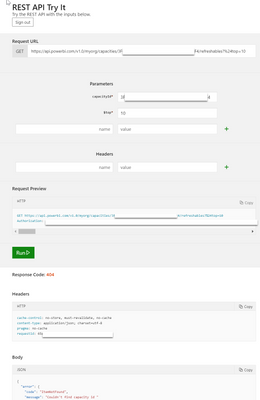
I am using below REST API with the capacityID
https://docs.microsoft.com/en-us/rest/api/power-bi/capacities/getrefreshablesforcapacity
It return the 404 error
{
"error": {
"code": "ItemNotFound",
"message": "Couldn't find capacity id "
}
}1. The capacity id should be correct, I get it from admin portal and as well as get capacity API, they are showing the same result
2. I did set up the API Permission in Azure App Registration as below. So the authorisation should be alright
Capacity.Read.All | Delegated | View all capacities | |
Capacity.ReadWrite.All | Delegated | Read and write all capacities |
Any idea about the error?
Thanks in advanced.
@Anonymous It's difficult to say, your URL is like:
https://api.powerbi.com/v1.0/myorg/capacities/{capacityId}/refreshables
Where you have replaced {capacityId} with something like 12345 so that you get:
https://api.powerbi.com/v1.0/myorg/capacities/12345/refreshables
Obviously 12345 is just an example, you would have your capacity id in there.
Thanks Greg for promptly reply.
Yes, I did put in capacities ID without {}, still showing as error below
@Anonymous Try ditching your query string part of the URL and see if that makes a difference, so the part after and including the ?
Unfortunatley, doesn't work even I ditching the string
If you have recently started exploring Fabric, we'd love to hear how it's going. Your feedback can help with product improvements.
A new Power BI DataViz World Championship is coming this June! Don't miss out on submitting your entry.
| User | Count |
|---|---|
| 1 | |
| 1 | |
| 1 | |
| 1 | |
| 1 |