cancel
Showing results for 
Search instead for 
Did you mean: 

Get Fabric Certified for FREE during Fabric Data Days. Don't miss your chance! Request now

Reply
mathRodrigues
Regular Visitor

Publish to Web - disable right click

Hello everybody!


I'm using Publish to Web to embed a dashboard in a web page, however, since I'm going to share private data, people can not see the data under the dashboard.


My questions:

1. Is there any way to disable the "See Records" and/or "Show Data" features in the dashboard?

2. Or, in a more general context, how can I disable right click on the dashboard?


If I could not achive this scenario with Publish to Web, can I do this with another Power BI service (such as Pro account or Power BI embed) ? 


Thank you!

3 REPLIES 3
henriquesilveir
Resolver IV
Resolver IV

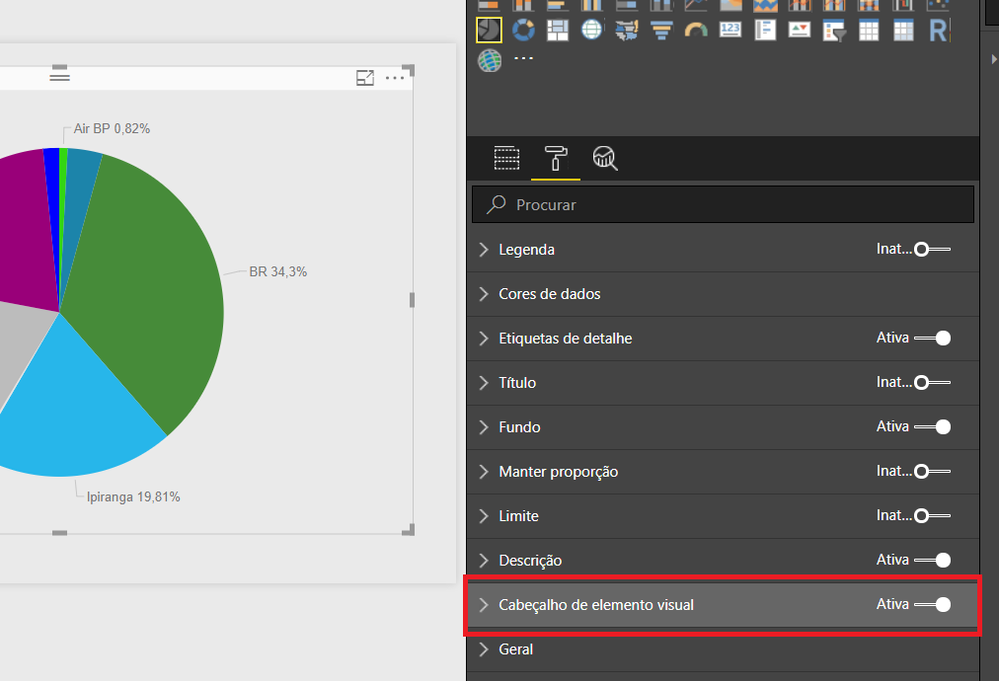
Hi @mathRodrigues , it is possible, go to the pane you have "Cabeçalho de Elementos" inside this menu, you could desactived drill down, expand to the next level, turn off to see data layout, etc.


I hope this post help you.


Hi again, @henriquesilveir!


Thanks again for your attention! I do not want to be rude, but you could more specifically where I can find this "Cabeçalho de Elementos"? I found only the "Cabeçalho de elemento visual", which is just a toggle option.


 Sem título.png


Hello, @mathRodrigues, i've checked more deeper about this 'action'. 

But is possible to do something, like the official article from MS: See record have some limitations:


See Records has the following limitations:

- You can't change the data in the See Records view and save it back to the report.
- You can't use See Records when your visual uses a calculated measure.
- You can't use See Records when you are connected to a live multidimensional (MD) model.


I recomend you to change your 'value field' to a calculated measure, for example, if you have a field that is Sales Amount, change him to a calculate Measure using some calculate like sum([table]SalesAmount) , i've tested it and work fine! 


It will help you! don't forget to mark as solution if you got it! 


Best Regards,

Helpful resources

Announcements
November Power BI Update Carousel

Power BI Monthly Update - November 2025

Check out the November 2025 Power BI update to learn about new features.

Fabric Data Days Carousel

Fabric Data Days

Advance your Data & AI career with 50 days of live learning, contests, hands-on challenges, study groups & certifications and more!

FabCon Atlanta 2026 carousel

FabCon Atlanta 2026

Join us at FabCon Atlanta, March 16-20, for the ultimate Fabric, Power BI, AI and SQL community-led event. Save $200 with code FABCOMM.