This time we’re going bigger than ever. Fabric, Power BI, SQL, AI and more. We're covering it all. You won't want to miss it.
Learn moreJoin the FabCon + SQLCon recap series. Up next: Power BI, Real-Time Intelligence, IQ and AI, and Data Factory take center stage. All sessions are available on-demand after the live show. Register now
Hi there. I am new here.
I'm writing here because I am having a common issue, according to what I could see. The totals in a table. First of all, I want to expain the data. We are counting products we sold. Our schema is like this:
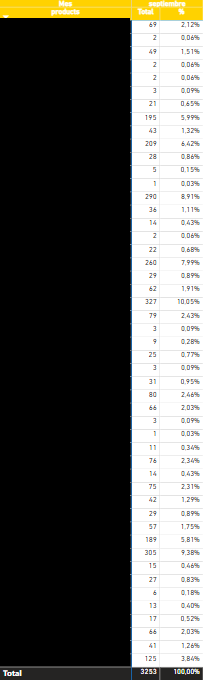
We have the ID number of the sell and, as columns, the producs sold. This is working fine, but when we try to make a table in PBI we have an issue with the totals:
As you can see, the total is 3253, but that same table exported to Excel gives another result (3079). this is the correct result:
I am sure that the issue is in the measures used to calculate that total in PBI. These are:
Total sells = DISTINCTCOUNTNOBLANK( 'Table'[ID_sell] )
and the one I am using in the table:
Total products sold = IF(HASONEVALUE(Table[products]),[Total sells],SUMX('Table',[Total sells]))
The individual total of each product is OK, but not the total. Can you please help me?
Thanks in advance.
Solved! Go to Solution.
Hi @grojnak,
Did you mean to use measure formula to calculate with multiple aggregations? If that is the case, I'd like to suggest you take a look at the Greg’s blog about measure with multiple aggregations:
Measure Totals, The Final Word
Regards,
Xiaoxin Sheng
Hi @grojnak,
Did you mean to use measure formula to calculate with multiple aggregations? If that is the case, I'd like to suggest you take a look at the Greg’s blog about measure with multiple aggregations:
Measure Totals, The Final Word
Regards,
Xiaoxin Sheng
Check out the April 2026 Power BI update to learn about new features.
If you have recently started exploring Fabric, we'd love to hear how it's going. Your feedback can help with product improvements.
A new Power BI DataViz World Championship is coming this June! Don't miss out on submitting your entry.
| User | Count |
|---|---|
| 4 | |
| 2 | |
| 1 | |
| 1 | |
| 1 |