cancel
Showing results for 
Search instead for 
Did you mean: 

The Power BI Data Visualization World Championships is back! Get ahead of the game and start preparing now! Learn more

Reply
jgoldsmith
New Member

PowerBI Developer Example - Authentication Error

Hi, 


I am following the example at: https://github.com/Microsoft/PowerBI-Developer-Samples/tree/master/App%20Owns%20Data

Edit: specifically /App Owns Data/PowerBIEmbedded_AppOwnsData/Controllers/EmbedReport

var authenticationResult = await authenticationContext.AcquireTokenAsync(resourceUrl, clientId, credential);


After plugging in user credentials and ClientId I am getting the following error response to the access token request:


{"error":"invalid_client","error_description":"AADSTS70002: The request body must contain the following parameter: 'client_secret or client_assertion'..."}


I'm using the application id from Azure Portal -> App Registrations as the ClientId. I've set appropriate app permissions (https://powerbi.microsoft.com/en-us/documentation/powerbi-developer-embedding-content/#appreg) and the user credentials work fine and have permission. 


It seems all of this stuff is in heavy flux. Please help get these dev examples working.


1 ACCEPTED SOLUTION
Eric_Zhang
Microsoft Employee
Microsoft Employee

@jgoldsmith

The APP Owns Data demo requires a Native app, please ensure that you're not using a Web App.

Capture.PNG

View solution in original post

4 REPLIES 4
leewsimpson
Frequent Visitor

How did you get this solved?


Im running the example code locally - it starts as a web app.  I get the same error.

Eric_Zhang
Microsoft Employee
Microsoft Employee

@jgoldsmith

The APP Owns Data demo requires a Native app, please ensure that you're not using a Web App.

Capture.PNG

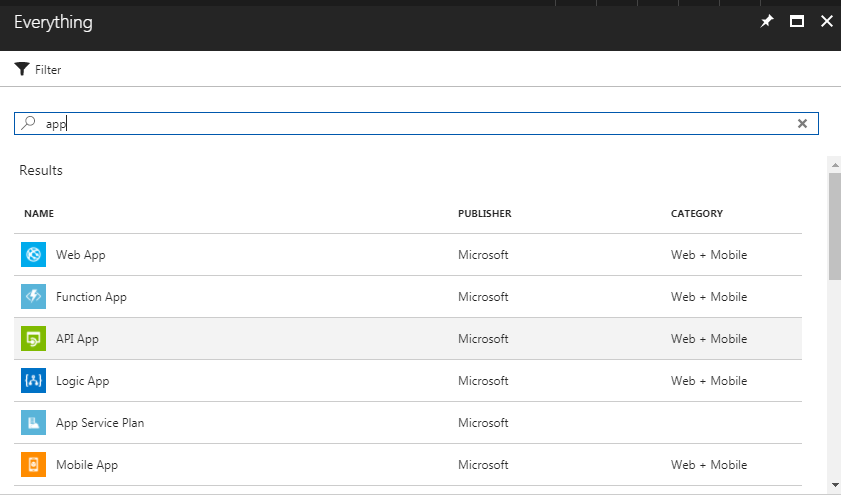
What is a "native" app? When I login to Azure Portal, I don't see "native" app, I only see Web App or Mobile App. 


azure_portal_app.PNG

"The demo requires a native app" is something thats sort of hard to find in any of the documentation. I got this to work by using dev.powerbi.com/apps and http://radacad.com/integrate-power-bi-into-your-application-part-1-register-your-app

Helpful resources

Announcements
Power BI DataViz World Championships

Power BI Dataviz World Championships

The Power BI Data Visualization World Championships is back! Get ahead of the game and start preparing now!

December 2025 Power BI Update Carousel

Power BI Monthly Update - December 2025

Check out the December 2025 Power BI Holiday Recap!

FabCon Atlanta 2026 carousel

FabCon Atlanta 2026

Join us at FabCon Atlanta, March 16-20, for the ultimate Fabric, Power BI, AI and SQL community-led event. Save $200 with code FABCOMM.