Hi
I have Power BI Report with a OData Dataset getting data from Dynamics365. I created in Power Bi Desktop.
Then I have a PowerBI.com workspace. Using the PowerBI.com Odata API, Azure AD API and PowerShell I am able to:
- Upload the Power BI Report to PowerBi.com. (using the powerbi.com api)
- Create an AAD Access Token for Dynamics 365 (using an App Registration and a d365 user with sufficient access)
- Update the dataset/datasource in the Power BI report to use the access token (using the powerbi.com api)
- Refresh the dataset/datasource in the Power BI report (using the powerbi.com api)
- Set up scheduled refreshs, where data is refreshed from D365 at 7am, 11am, 1pm and 15pm (also set up using PowerBi APi).
The refresh takes place at the requested times (or it tries to) because the refresh fails with the following error:
"The credentials provided for the OData source are invalid."
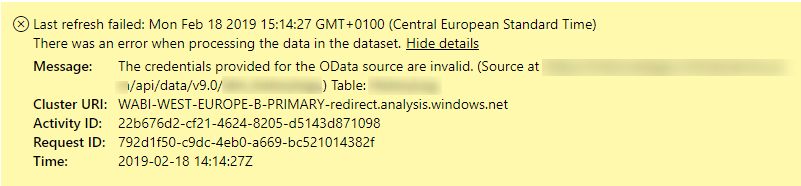
Since I was able to refresh earlier just after updating with the access token, I am guessing that the access token is no longer valid and PowerBi was not able to refresh it by itself.
My question is:
- How do I - using the PowerBI OData Api - update the a dataset/datasources to have valid credentials that will work when PowerBI is using refresh intervals?
- I am deploying to multiple instances, so I don't want to do it manually.
Any help/suggestions are much appriciated.
Thanks
Mads
---
My code for generating the access token:
Function Get-AADToken {
  $Username = "<secret-username-to-d365user-goes-here>"
  $Password = ConvertTo-SecureString "<secret-password-to-d365user-goes-here>" -AsPlainText -Force
  $ClientId = "<client-appid-to-d365-app-registration-goes-here>"
  $Resource = "<url-to-d365-instance-goes-here>"

  $authorityUrl = "https://login.microsoftonline.com/common/oauth2/authorize"

  ## load active directory client dll
  $typePath = $PSScriptRoot + "\Microsoft.IdentityModel.Clients.ActiveDirectory.dll"
  Add-Type -Path $typePath

  Write-Verbose "Loaded the Microsoft.IdentityModel.Clients.ActiveDirectory.dll"

  Write-Verbose "Using authority: $authorityUrl"
  $authContext = New-Object -TypeName Microsoft.IdentityModel.Clients.ActiveDirectory.AuthenticationContext -ArgumentList ($authorityUrl)
  $credential = New-Object -TypeName Microsoft.IdentityModel.Clients.ActiveDirectory.UserCredential -ArgumentList ($UserName, $Password)

  Write-Verbose "Trying to aquire token for resource: $Resource"
  $authResult = $authContext.AcquireToken($Resource, $clientId, $credential)

  Write-Verbose "Authentication Result retrieved for: $($authResult.UserInfo.DisplayableId)"
  return $authResult.AccessToken
}

$accesstoken = Get-AADToken


