Don't miss your chance to take the Fabric Data Engineer (DP-600) exam for FREE! Find out how by watching the DP-600 session on-demand now through April 28th.
Learn moreJoin the FabCon + SQLCon recap series. Up next: Power BI, Real-Time Intelligence, IQ and AI, and Data Factory take center stage. All sessions are available on-demand after the live show. Register now
Hello,
we have several RDL reports on PowerBI and would like to use the "Export To File in Group" API, to generate the report.
This works fine for parameterless reports.
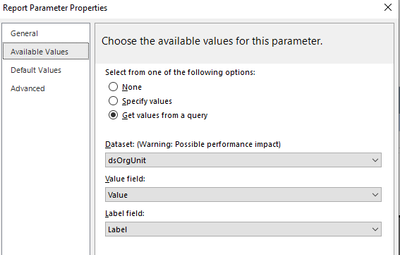
When we are trying this for reports with parameters witht the option "Get values from a query", we have to put in the value instead of the label.
E.g. results from the query:
Value = 1, Label = All
Value = 2, Label = None
In the API Body we have to put in
"parameterValues":[
{
"name":"OrgUnit",
"value":"1"
}
]
Is there a way to put in the Label field value, like
"parameterValues":[
{
"name":"OrgUnit",
"value":"All"
}
]
Many thanks for your help.
Joerg
Hi @JoergSch ,
Please review the content in the following link and check whether it can export RDL reports with parameters using Power Automate.
Multivalue parameters in #PowerBI paginated report when using #PowerAutomate to export to file
Best Regards
Hi,
the problem is not the multivalue parameter. The problem is that the parameter is filled by a SQL query with a value and a name. The user is only seeing the Label (e.g All, None, ..), but the Value fields behing that are e.g. 1,2,3,..
When we try to generate the report via API, we have to provide the Value information (1,2,3,..) and not the Label information.
The "End-user" wouldn't know what are the values for each Label.
Best regards,
Joerg
Check out the April 2026 Power BI update to learn about new features.
If you have recently started exploring Fabric, we'd love to hear how it's going. Your feedback can help with product improvements.
A new Power BI DataViz World Championship is coming this June! Don't miss out on submitting your entry.
| User | Count |
|---|---|
| 2 | |
| 1 | |
| 1 | |
| 1 | |
| 1 |