Get certified for free when you join Fabric Data Days 2026 and dive into Fabric, Power BI, SQL, AI, and other essential data skills.
Join nowData Days is here! Join us now for 60+ days of learning, challenges, and connection. Learn more
Olá!
Estou tentando atualizar e publicar um Power BI automaticamente através do PowerAutomate, mas estou lidando com o erro abaixo:
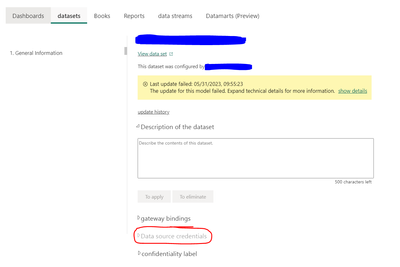
A atualização deste modelo falhou. Expanda os detalhes técnicos para obter mais informações.
Além disso, a guia Credenciais da fonte de dados está desativada, conforme mostrado na imagem abaixo.
Você poderia me dizer o que devo fazer para que o PowerAutomate possa atualizar e publicar o PowerBi?
Please provide more details. Are you the owner of the dataset? what are the data sources?
Hi,
Yes, I am the owner of the dataset.
The data sources are files in excel and sharepoint. But my account (credentials) has all access. 😊😊
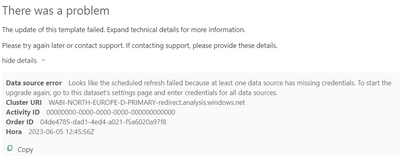
Here:
There was a problem
The update of this template failed. Expand technical details for more information.
please follow the instructions: " at least one data source has missing credentials. To start the upgrade again, go to this dataset's settings page and enter credentials for all data sources "
yes, but if you see the firts image (in the first message here), the tab "data source credentials" it's blocked. I wanna know how to desbloked.
Don't miss out on Data Days, June 15 through August 7. Learn Fabric, Power BI, SQL, AI and more.
Check out the May 2026 Power BI update to learn about new features.
| User | Count |
|---|---|
| 2 | |
| 2 | |
| 1 | |
| 1 | |
| 1 |