This is best Fabric, Power BI, SQL and AI community event. How do we know? The last event sold out! Save €200 with code FABCMTY200.
Register nowThe Fabric community is upgrading! Read all of the details including the timeline and what you can expect. Learn more
Hi dear comuunity.
I have a situation to solve but I could not find a solution after many attempts .
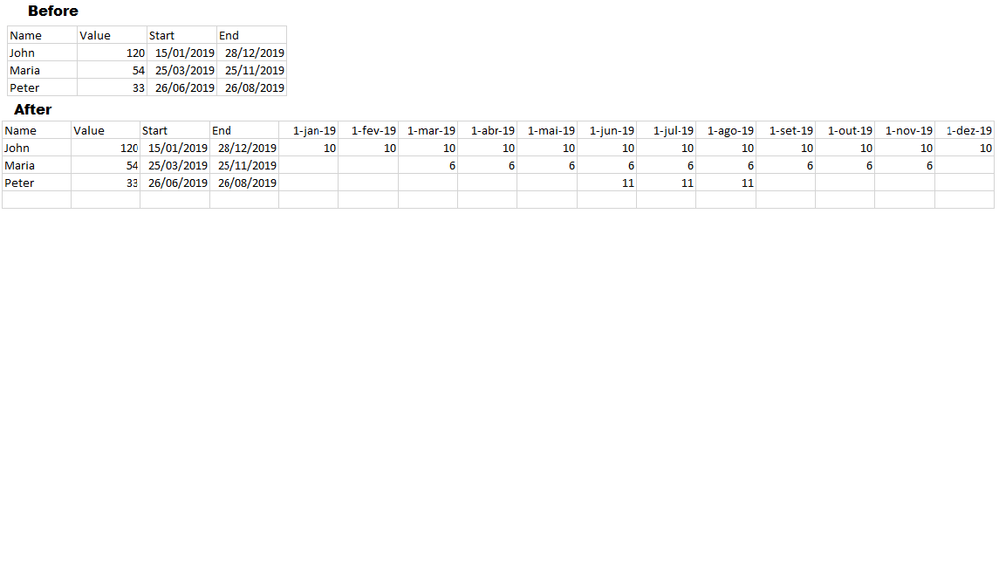
I need to create one column for each month based on the date range. For example: I have one row with a start date on 15/jan/2019 and end date as 28/dec/2019 that has 120 man days as value. The top row would be the largest date interval.
My desired out put would be 12 columns with the first month day as header and 120 divided by number of months in the date range.
For the others row I need the same calculation considering the correct column position depending on the specific month.
Thanks a lot.
Join us in Barcelona for FabCon and SQLCon, the Fabric, Power BI, SQL, and AI community event. Save €200 with code FABCMTY200.
| User | Count |
|---|---|
| 2 | |
| 1 | |
| 1 | |
| 1 | |
| 1 |
| User | Count |
|---|---|
| 4 | |
| 2 | |
| 1 | |
| 1 | |
| 1 |