cancel
Showing results for 
Search instead for 
Did you mean: 

Try your skills in the Power BI Dataviz World Championship! Round one ends June 26. Join now

Reply
Anonymous
Not applicable

Power BI REST API: Admin - Get Activity Events / error 400

Hello lovely members , 


Currently im working with an Power BI rest API.

i created an application on azure and i set up everything and i was able to use admin API in my script


Unfortunately , when i try to use the "Admin - Get Activity Events" API i have the 400 error. here is my python script : 


Tenant_id = 'Test'
client_id = 'Test'
client_secret = 'Test'


scope = 'https://analysis.windows.net/powerbi/api/.default'

client_secret_credential_class = ClientSecretCredential(tenant_id=tenant_id, client_id=client_id, client_secret=client_secret)

access_token_class = client_secret_credential_class.get_token(scope)
token_string = access_token_class.token
 
 header = {'Content-Type':'application/json','Authorization': 'Bearer ' + token_string , "Accept": None}
response1 = requests.get('https://api.powerbi.com/v1.0/myorg/admin/activityevents' , headers = header)
 
 print(response1.status_code)
 
 
Any idea ? thanks in advance all 
1 ACCEPTED SOLUTION
Anonymous
Not applicable

Hi @Anonymous ,

First, you need to make sure you have the following required permissions and scopes, and check if you hit any of following limitations.
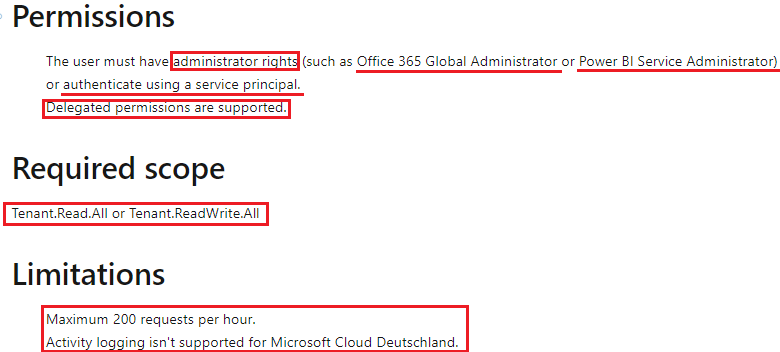
yingyinr_0-1640311435938.png

After check the above info are OK, please try to update the API with the parameters. In the ActivityEvents REST API call, you must specify a start date and end date and optionally a filter to select activities by activity type or user ID. Because the activity log could contain a large amount of data, the ActivityEvents API currently only supports downloading up to one day of data per request. In other words, the start date and end date must specify the same day, as in the following example. Make sure you specify the DateTime values in UTC format. You can get the details from the following documentation:

ActivityEvents REST API

https://api.powerbi.com/v1.0/myorg/admin/activityevents?startDateTime='2021-12-21T00:00:00'&endDateTime='2021-12-21T23:59:59'

Finally, check out the solution in the following thread with similar problem to yours, and hopefully it will solve your problem as well.

Error accessing Power BI REST API: Admin - Get Activity Events using Service Principal auth

we had the same issue and after investigations with MS support we found out that the Admin Consent should be removed from the app permissions.  Once removed the 

PowerBINotAuthorizedException

error was gone !


Best Regards

View solution in original post

1 REPLY 1
Anonymous
Not applicable

Hi @Anonymous ,

First, you need to make sure you have the following required permissions and scopes, and check if you hit any of following limitations.

yingyinr_0-1640311435938.png

After check the above info are OK, please try to update the API with the parameters. In the ActivityEvents REST API call, you must specify a start date and end date and optionally a filter to select activities by activity type or user ID. Because the activity log could contain a large amount of data, the ActivityEvents API currently only supports downloading up to one day of data per request. In other words, the start date and end date must specify the same day, as in the following example. Make sure you specify the DateTime values in UTC format. You can get the details from the following documentation:

ActivityEvents REST API

https://api.powerbi.com/v1.0/myorg/admin/activityevents?startDateTime='2021-12-21T00:00:00'&endDateTime='2021-12-21T23:59:59'

Finally, check out the solution in the following thread with similar problem to yours, and hopefully it will solve your problem as well.

Error accessing Power BI REST API: Admin - Get Activity Events using Service Principal auth

we had the same issue and after investigations with MS support we found out that the Admin Consent should be removed from the app permissions.  Once removed the 

PowerBINotAuthorizedException

error was gone !


Best Regards

Helpful resources

Announcements
Fabric Data Days is here Carousel

Fabric Data Days 2026

Don't miss out on Data Days, June 15 through August 7. Learn Fabric, Power BI, SQL, AI and more.

Power BI DataViz World Championships carousel

Power BI DataViz World Championships - June 2026

A new Power BI DataViz World Championship is coming this June! Don't miss out on submitting your entry.