Don't miss your chance to take the Fabric Data Engineer (DP-600) exam for FREE! Find out how by attending the DP-600 session on April 23rd (pacific time), live or on-demand.
Learn moreNext up in the FabCon + SQLCon recap series: The roadmap for Microsoft SQL and Maximizing Developer experiences in Fabric. All sessions are available on-demand after the live show. Register now
Hello,
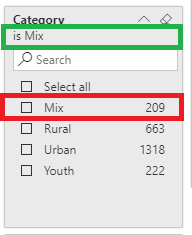
I'm currently facing an issue where the visual is loading with the filter applied. The label is correctly identifying the filter applied but the checkbox is not checked. (image below)
When I'm trying to get the filters using javascript I'm getting an error with the following error "Basic filter requires an operator (In | Not)"
This was working last week.
I've checked the open issues on Power BI Support and, currently, there is none with this issue.
As something changed on the API?
Thank you.
Hi @alexmcarreira
I am not aware of any recent changes to the filter structures (doesn't mean it hasn't happend) 🙂
Are you able to share the filter object/code-structure that you are applying to your report?
Cheers,
Matt
Hello,
This is the filter structure that I'm applying to the visual in question.
[
{
"$schema": "http://powerbi.com/product/schema#basic",
"target": {
"table": "Product",
"hierarchy": "Product Hierarchy",
"hierarchyLevel": "Category"
},
"filterType": 1,
"displaySettings": {
"isHiddenInViewMode": false
},
"operator": "In",
"values": [
"Mix"
],
"requireSingleSelection": false
},
{
"$schema": "http://powerbi.com/product/schema#basic",
"target": {
"table": "Product",
"hierarchy": "Product Hierarchy",
"hierarchyLevel": "Segment"
},
"filterType": 1,
"displaySettings": {
"isHiddenInViewMode": false
},
"operator": "All",
"values": [],
"requireSingleSelection": false
},
{
"$schema": "http://powerbi.com/product/schema#basic",
"target": {
"table": "Product",
"hierarchy": "Product Hierarchy",
"hierarchyLevel": "Product"
},
"filterType": 1,
"displaySettings": {
"isHiddenInViewMode": false
},
"operator": "All",
"values": [],
"requireSingleSelection": false
},
{
"$schema": "http://powerbi.com/product/schema#basic",
"target": {
"table": "Sales",
"measure": "Total Sales"
},
"filterType": 1,
"displaySettings": {
"isHiddenInViewMode": false
},
"operator": "All",
"values": [],
"requireSingleSelection": false
},
{
"$schema": "http://powerbi.com/product/schema#basic",
"target": {
"table": "Sales",
"measure": "Total Sales (py)"
},
"filterType": 1,
"displaySettings": {
"isHiddenInViewMode": false
},
"operator": "All",
"values": [],
"requireSingleSelection": false
},
{
"$schema": "http://powerbi.com/product/schema#basic",
"target": {
"table": "Sales",
"measure": "% Sales Growth vs PY"
},
"filterType": 1,
"displaySettings": {
"isHiddenInViewMode": false
},
"operator": "All",
"values": [],
"requireSingleSelection": false
}
]
Thanks.
Alexandre Carreira
Hello,
Do you have any news on this issue?
Thanks
Apologies @alexmcarreira for the delay in responding, it has been a crazy few days.
I was going to try and replicate this in a solution - as I had never tested JavaScript filters against a hierarchy before.
(I am yet to get around to this).
One thing I did notice... was the use of 'ALL' inside some of the basic filters.
{
"$schema": "http://powerbi.com/product/schema#basic",
"target": {
"table": "Sales",
"measure": "Total Sales (py)"
},
"filterType": 1,
"displaySettings": {
"isHiddenInViewMode": false
},
"operator": "All",
"values": [],
"requireSingleSelection": false
}
My understanding is that this is not a valid operator for this filter type... and is probably the reason for the "Basic filter requires an operator (In | Not)" error.
If you want to default to having ALL values selected, then you should either not supply the filter definition at all... OR select "IN" with an empty array. The last time I used this, it behaved in the same was as having all options selected.
I will try and get some time to look at testing this with the hierarchy, just in case that is the cause of your original issue...
{
"$schema": "http://powerbi.com/product/schema#basic",
"target": {
"table": "Product",
"hierarchy": "Product Hierarchy",
"hierarchyLevel": "Category"
},
"filterType": 1,
"displaySettings": {
"isHiddenInViewMode": false
},
"operator": "In",
"values": [
"Mix"
],
"requireSingleSelection": false
}Hello Matt,
Any updates regarding this issue? Have you had the chance to test this with the hierarchy?
Regards,
Rúben
If you have recently started exploring Fabric, we'd love to hear how it's going. Your feedback can help with product improvements.
A new Power BI DataViz World Championship is coming this June! Don't miss out on submitting your entry.
Share feedback directly with Fabric product managers, participate in targeted research studies and influence the Fabric roadmap.
| User | Count |
|---|---|
| 1 | |
| 1 | |
| 1 | |
| 1 | |
| 1 |
| User | Count |
|---|---|
| 5 | |
| 4 | |
| 3 | |
| 3 | |
| 2 |