cancel
Showing results for 
Search instead for 
Did you mean: 

We've captured the moments from FabCon & SQLCon that everyone is talking about, and we are bringing them to the community, live and on-demand. Starts on April 14th. Register now

Reply
Fcunha
Frequent Visitor

Power BI Embedded - Status Code 403

Hello Guys!

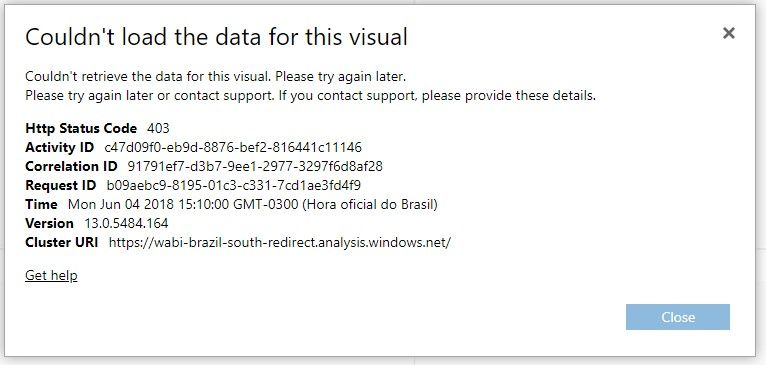
I've developed an application using power bi embedded that performs authentication on the portal to access a specific report. Everything works perfectly, but sometimes I get the error illustrated. What could be causing it? Has the token expired? Could the user be accessing during the scheduled update of the report? Thanks.


Evidência_Portal.jpg

1 ACCEPTED SOLUTION
v-jiascu-msft
Microsoft Employee
Microsoft Employee

Hi @Fcunha,


As we can see from the error message, the Http Status Code 403 means something wrong with the authentication. Please check these things below.

1. The token could be expired.

2. Is the App workspace assigned to a capacity? Maybe the resource run out. Please refer to embed-sample-for-customers#create-a-dedicated-capacity.


Best Regards,

Dale

Community Support Team _ Dale
If this post helps, then please consider Accept it as the solution to help the other members find it more quickly.

View solution in original post

4 REPLIES 4
jmweekes
Advocate II
Advocate II

We are getting this error as well with an embedded report using Embed for Your Customers.  Not all the time but several times a day.  The page renders successfully but after a short time (well before the 1-hour token expiration time) upon clicking on a visualization, the visualization shows the error (X) with a See details link, which shows the error below.  It seems to occur after a short period of inactivity.  We have recreated it in Chrome, IE, Firefox and Edge.


I can refresh the page (which reuses the existing token) and the report re-loads and functions as it should.  (Since original post, it occurred to me that our code will new the token when the page is refreshed.  Regardless, we are getting errors well before the expected expiration of the token.)

I see this question is marked as resolved, but no indication of which of the suggestions resolved the issue.  Further, I don't think our token is (or should be) expired.


Any idea what might be going on or how to troubleshoot further?


jmweekes_1-1618443060498.png


I believe we were causing our issue.  We developed a common web site for embedding reports, essentially passing Workspace Id, Report Id, Effective Identify User Id and Effective Identity Role.  The Azure Access and Power BI Embed tokens were saved as a global variables.  I believe a new embed token was generated each time a user accessed the site to embed a report but the Azure Access token was not regenerated.  Other users would then get errors when they altered filter criteria, etc., on their reports generated with tokens that were expired when most recent token was generated.  I believe we changed the process to generate a new Access and Embed token for report request.  Or at least I think it was something like this.

v-jiascu-msft
Microsoft Employee
Microsoft Employee

Hi @Fcunha,


Could you please mark the proper answers as solutions?


Best Regards,

Dale

Community Support Team _ Dale
If this post helps, then please consider Accept it as the solution to help the other members find it more quickly.
v-jiascu-msft
Microsoft Employee
Microsoft Employee

Hi @Fcunha,


As we can see from the error message, the Http Status Code 403 means something wrong with the authentication. Please check these things below.

1. The token could be expired.

2. Is the App workspace assigned to a capacity? Maybe the resource run out. Please refer to embed-sample-for-customers#create-a-dedicated-capacity.


Best Regards,

Dale

Community Support Team _ Dale
If this post helps, then please consider Accept it as the solution to help the other members find it more quickly.

Helpful resources

Announcements
New to Fabric survey Carousel

New to Fabric Survey

If you have recently started exploring Fabric, we'd love to hear how it's going. Your feedback can help with product improvements.

Power BI DataViz World Championships carousel

Power BI DataViz World Championships - June 2026

A new Power BI DataViz World Championship is coming this June! Don't miss out on submitting your entry.

Join our Fabric User Panel

Join our Fabric User Panel

Share feedback directly with Fabric product managers, participate in targeted research studies and influence the Fabric roadmap.

March Power BI Update Carousel

Power BI Community Update - March 2026

Check out the March 2026 Power BI update to learn about new features.