Don't miss your chance to take the Fabric Data Engineer (DP-700) exam on us!
Learn moreNext up in the FabCon + SQLCon recap series: The roadmap for Microsoft SQL and Maximizing Developer experiences in Fabric. All sessions are available on-demand after the live show. Register now
It was noticed shortly after 7/1 that our production Power BI Embed webpage started returnning "Unauthorized access"I thought it was maybe the app registration secret had expired, nope, it is set to never. I used the production code and configured for http://localhost:13526/ and yesterday that was working fine, kept working with it and now I get . "The remote server returned an error: (401) Unauthorized." Tried created a new app registration using https://dev.powerbi.com/apps and set it up server side, usedd http://localhost:13526/ for the target and redirect urls. After request for credentials, I get the authorization to use the api, and then after that I know get "The remote server returned an error: (401) Unauthorized." I did notice the Embed samples are updated to .Net 4.8, I am not sure if that is what is causing my issue as I used the embed samples from about 3 years ago. Any insight into this is much appreciated. Rick
Solved! Go to Solution.
Hi, The issue was resolved by upgrading the PBI code line to .Net 4.8 and adding SSL to the website (now required for redirect).
Hi @fosters4him
A couple of things come to mind...
Have you configured your app registration (in Azure) to have all required permissions for the actions you are trying to perform with the Power BI REST API?
In Azure you should be able to see something like the following.
If you are trying to fetch a list of dashboards for instance... then you will need 'Dashboard.Read.All' enabled.
If these are set correctly... and the generated secret hasn't expired, then it may be access to one of your workspaces in Power BI.
It is worth double checking that the workspace you are connecting through to - has got the registered account listed within the workspace access list.
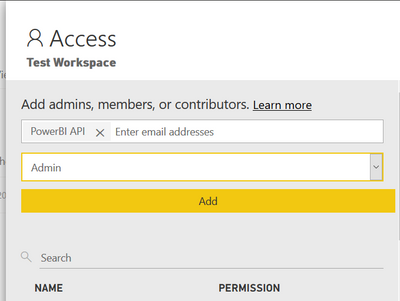
I cannot remember if you still need to add the service account as an admin still - but that is what I have mine set to.
Let me know if any of this helps.
Cheers, Matt
If you have recently started exploring Fabric, we'd love to hear how it's going. Your feedback can help with product improvements.
A new Power BI DataViz World Championship is coming this June! Don't miss out on submitting your entry.
Share feedback directly with Fabric product managers, participate in targeted research studies and influence the Fabric roadmap.
| User | Count |
|---|---|
| 2 | |
| 1 | |
| 1 | |
| 1 | |
| 1 |